ColorlibHQ / AdminLTE
AdminLTE - Free admin dashboard template based on Bootstrap 5
AI Architecture Analysis
This repository is indexed by RepoMind. By analyzing ColorlibHQ/AdminLTE in our AI interface, you can instantly generate complete architecture diagrams, visualize control flows, and perform automated security audits across the entire codebase.
Our Agentic Context Augmented Generation (Agentic CAG) engine loads full source files into context, avoiding the fragmentation of traditional RAG systems. Ask questions about the architecture, dependencies, or specific features to see it in action.
Embed this Badge
Showcase RepoMind's analysis directly in your repository's README.

Repository Summary (README)
PreviewAdminLTE - Bootstrap 5 Admin Dashboard



AdminLTE is a fully responsive administration template. Based on Bootstrap 5 framework and also the JavaScript plugins. Highly customizable and easy to use. Fits many screen resolutions from small mobile devices to large desktops.
What's New in v4.0.0-rc6
Security & Feature Release - Important security fixes and new sidebar persistence feature:
- Security Fixes - Resolved 4 vulnerabilities (XSS in Astro, auth bypass, unsanitized attributes)
- Sidebar State Persistence - Sidebar now remembers collapsed/expanded state across page refreshes
- Node.js 22 - Updated all GitHub Actions workflows to Node.js 22 LTS (supported until 2027)
- Latest Dependencies - 15+ packages updated including Astro 5.16.4, Prettier 3.7.4, Rollup 4.53.3
- CI/CD Improvements - Updated CodeQL actions to v3, fixed release workflow bugs
Key Improvements:
- ✅ Zero security vulnerabilities - all npm audit issues resolved
- ✅ Sidebar state persists in localStorage (configurable, SSR-safe, mobile-aware)
- ✅ GitHub Actions use Node.js 22 (Active LTS until April 2027)
- ✅ CodeQL security scanning updated to latest v3 actions
- ✅ Release workflow fixed for proper asset packaging
Install the latest:
npm install admin-lte@4.0.0-rc6
See the CHANGELOG.md for complete details.
Looking for Premium Templates?
AdminLTE.io just opened a new premium templates page. Hand picked to ensure the best quality and the most affordable prices. Visit https://adminlte.io/premium for more information.
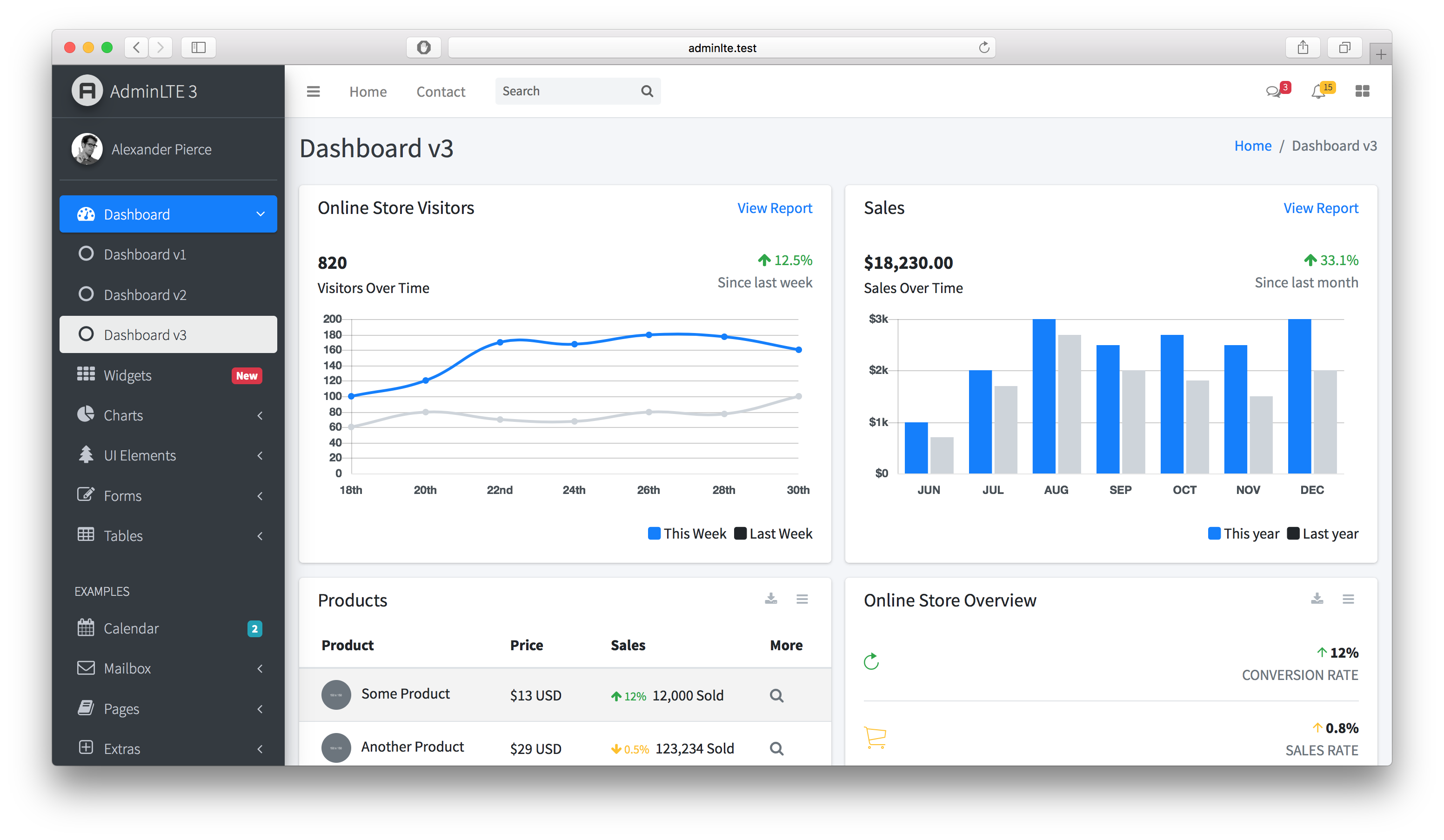
AdminLTE has been carefully coded with clear comments in all of its JS, SCSS and HTML files. SCSS has been used to increase code customizability.
Quick start
Development
To start developing with AdminLTE:
- Install dependencies:
npm install - Start development server:
npm start(opens browser at http://localhost:3000) - Start coding! Files auto-compile and refresh on changes
Production Build
To build for production:
- Full production build:
npm run production(includes linting and optimization) - Quick build:
npm run build(faster for development/testing)
Available Scripts
npm start- Start development server with file watchingnpm run build- Build all assets for developmentnpm run production- Full production build with linting and bundlewatchnpm run lint- Run all linters (JS, CSS, docs, lockfile)npm run css- Build CSS onlynpm run js- Build JavaScript only
Browser Support
AdminLTE supports all modern browsers with the latest Bootstrap 5.3.7:
- Chrome (latest)
- Firefox (latest)
- Safari (latest)
- Edge (latest)
Platform Support
AdminLTE v4 build scripts work cross-platform:
- Windows - Command Prompt, PowerShell, Git Bash
- macOS - Terminal, iTerm2
- Linux - Bash, Zsh, and other Unix shells
All npm scripts use cross-platform utilities to ensure consistent behavior across different operating systems.
Security & Production Deployment
Important Security Notice
AdminLTE is a UI template - when deploying to production, follow these critical guidelines:
What to Deploy:
- Only compiled production assets:
dist/js/adminlte.min.jsanddist/css/adminlte.min.css - Your application-specific files
What NOT to Deploy:
node_modules/directory- Demo/example HTML files (index.html, index2.html, index3.html, etc.)
- Source files (
src/directory) - Development configuration files
CVE-2021-36471 Notice: This CVE is disputed and does not represent a vulnerability in AdminLTE. It refers to demo pages being accessible when developers incorrectly deploy example files to production. AdminLTE v4 has a clear separation between development demos and production assets. See SECURITY.md for complete details.
Production Build:
npm run production # Builds optimized assets in dist/
For detailed security guidelines, authentication requirements, and best practices, see SECURITY.md.
Sponsorship
Support AdminLTE development by becoming a sponsor or donor.
<p align="center"> <a href="https://github.com/sponsors/danny007in"> <img src="https://img.shields.io/static/v1?label=Sponsor&message=%E2%9D%A4&logo=GitHub&color=%23fe8e86" alt="Sponsor on GitHub" /> </a> <a href="https://www.paypal.me/daniel007in"> <img src="https://img.shields.io/static/v1?label=Donate&message=%E2%9D%A4&logo=PayPal&color=%2300457C" alt="Donate via PayPal" /> </a> </p>Our Sponsors
<p align="center"> <a href="https://github.com/spizzo14"><img src="https://unavatar.io/github/spizzo14?fallback=https%3A%2F%2Fraw.githubusercontent.com%2FJamesIves%2Fgithub-sponsors-readme-action%2Fdev%2F.github%2Fassets%2Fplaceholder.png" width="50" height="50" alt="User avatar: spizzo14" loading="lazy" /></a> <a href="https://github.com/tomhappyblock"><img src="https://unavatar.io/github/tomhappyblock?fallback=https%3A%2F%2Fraw.githubusercontent.com%2FJamesIves%2Fgithub-sponsors-readme-action%2Fdev%2F.github%2Fassets%2Fplaceholder.png" width="50" height="50" alt="User avatar: tomhappyblock" loading="lazy" /></a> <a href="https://github.com/stefanmorderca"><img src="https://unavatar.io/github/stefanmorderca?fallback=https%3A%2F%2Fraw.githubusercontent.com%2FJamesIves%2Fgithub-sponsors-readme-action%2Fdev%2F.github%2Fassets%2Fplaceholder.png" width="50" height="50" alt="User avatar: stefanmorderca" loading="lazy" /></a> <a href="https://github.com/tito10047"><img src="https://unavatar.io/github/tito10047?fallback=https%3A%2F%2Fraw.githubusercontent.com%2FJamesIves%2Fgithub-sponsors-readme-action%2Fdev%2F.github%2Fassets%2Fplaceholder.png" width="50" height="50" alt="User avatar: tito10047" loading="lazy" /></a> <a href="https://github.com/sitchi"><img src="https://unavatar.io/github/sitchi?fallback=https%3A%2F%2Fraw.githubusercontent.com%2FJamesIves%2Fgithub-sponsors-readme-action%2Fdev%2F.github%2Fassets%2Fplaceholder.png" width="50" height="50" alt="User avatar: sitchi" loading="lazy" /></a> <a href="https://github.com/npreee"><img src="https://unavatar.io/github/npreee?fallback=https%3A%2F%2Fraw.githubusercontent.com%2FJamesIves%2Fgithub-sponsors-readme-action%2Fdev%2F.github%2Fassets%2Fplaceholder.png" width="50" height="50" alt="User avatar: npreee" loading="lazy" /></a> <a href="https://github.com/isaacmorais"><img src="https://unavatar.io/github/isaacmorais?fallback=https%3A%2F%2Fraw.githubusercontent.com%2FJamesIves%2Fgithub-sponsors-readme-action%2Fdev%2F.github%2Fassets%2Fplaceholder.png" width="50" height="50" alt="User avatar: isaacmorais" loading="lazy" /></a> </p> <p align="center"> <a href="https://github.com/sponsors/danny007in">Your avatar here? Become a sponsor</a> </p>Contributing
- Highly welcome.
- For your extra reference check AdminLTE v4 Contribution Guide
- First thing first, you should have bit knowledge about NodeJS.
- Github Knowledge.
- Install NodeJS LTS version.
- Clone this Repository to your machine and change to
masterbranch. - Go to Cloned Folder.
- In cli/bash run
npm installit will install dependency frompackage.json. - After installation completes, run
npm start - Cool, Send your changes in PR to
masterbranch.
License
AdminLTE is an open source project by AdminLTE.io that is licensed under MIT. AdminLTE.io reserves the right to change the license of future releases.