cadence-workflow / cadence
Cadence is a distributed, scalable, durable, and highly available orchestration engine to execute asynchronous long-running business logic in a scalable and resilient way.
AI Architecture Analysis
This repository is indexed by RepoMind. By analyzing cadence-workflow/cadence in our AI interface, you can instantly generate complete architecture diagrams, visualize control flows, and perform automated security audits across the entire codebase.
Our Agentic Context Augmented Generation (Agentic CAG) engine loads full source files into context, avoiding the fragmentation of traditional RAG systems. Ask questions about the architecture, dependencies, or specific features to see it in action.
Embed this Badge
Showcase RepoMind's analysis directly in your repository's README.

Repository Summary (README)
PreviewCadence





Cadence Workflow is an open-source platform since 2017 for building and running scalable, fault-tolerant, and long-running workflows. This repository contains the core orchestration engine and tools including CLI, schema managment, benchmark and canary.
Getting Started
Cadence backend consists of multiple services, a database (Cassandra/MySQL/PostgreSQL) and optionally Kafka+Elasticsearch. As a user, you need a worker which contains your workflow implementation. Once you have Cadence backend and worker(s) running, you can trigger workflows by using SDKs or via CLI.
- Start cadence backend components locally
docker compose -f docker/docker-compose.yml up
- Run the Samples
Try out the sample recipes for Go or Java.
- Visit UI
Visit http://localhost:8088 to check workflow histories and detailed traces.
Client Libraries
You can implement your workflows with one of our client libraries:
- Official Cadence Go SDK
- Official Cadence Java SDK There are also unofficial Python and Ruby SDKs developed by the community.
You can also use iWF as a DSL framework on top of Cadence.
CLI
Cadence CLI can be used to operate workflows, tasklist, domain and even the clusters.
You can use the following ways to install Cadence CLI:
- Use brew to install CLI:
brew install cadence-workflow- Follow the instructions if you need to install older versions of CLI via homebrew. Usually this is only needed when you are running a server of a too old version.
- Use docker image for CLI:
docker run --rm ubercadence/cli:<releaseVersion>ordocker run --rm ubercadence/cli:master. Be sure to update your image when you want to try new features:docker pull ubercadence/cli:master - Build the CLI binary yourself, check out the repo and run
make cadenceto build all tools. See CONTRIBUTING for prerequisite of make command. - Build the CLI image yourself, see instructions
Cadence CLI is a powerful tool. The commands are organized by tabs. E.g. workflow->batch->start, or admin->workflow->describe.
Please read the documentation and always try out --help on any tab to learn & explore.
UI
Try out Cadence Web UI to view your workflows on Cadence. (This is already available at localhost:8088 if you run Cadence with docker compose)
Other binaries in this repo
Bench/stress test workflow tools
See bench documentation.
Periodical feature health check workflow tools(aka Canary)
See canary documentation.
Schema tools for SQL and Cassandra
The tools are for manual setup or upgrading database schema
- If server runs with Cassandra, Use Cadence Cassandra tool
- If server runs with SQL database, Use Cadence SQL tool
The easiest way to get the schema tool is via homebrew.
brew install cadence-workflow also includes cadence-sql-tool and cadence-cassandra-tool.
- The schema files are located at
/usr/local/etc/cadence/schema/. - To upgrade, make sure you remove the old ElasticSearch schema first:
mv /usr/local/etc/cadence/schema/elasticsearch /usr/local/etc/cadence/schema/elasticsearch.old && brew upgrade cadence-workflow. Otherwise ElasticSearch schemas may not be able to get updated. - Follow the instructions if you need to install older versions of schema tools via homebrew.
However, easier way is to use new versions of schema tools with old versions of schemas.
All you need is to check out the older version of schemas from this repo. Run
git checkout v0.21.3to get the v0.21.3 schemas in the schema folder.
Contributing
We'd love your help in making Cadence great. Please review our contribution guide.
If you'd like to propose a new feature, first join the CNCF Slack workspace in the #cadence-users channel to start a discussion.
Please visit our documentation site for production/cluster setup.
Learning Resources
See Maxim's talk at Data@Scale Conference for an architectural overview of Cadence.
Visit cadenceworkflow.io to learn more about Cadence. Join us in Cadence Documentation project. Feel free to raise an Issue or Pull Request there.
Community
- Github Discussion
- Best for Q&A, support/help, general discusion, and annoucement
- Github Issues
- Best for reporting bugs and feature requests
- StackOverflow
- Best for Q&A and general discusion
- Slack - Join #cadence-users channel on CNCF Slack
- Best for contributing/development discussion
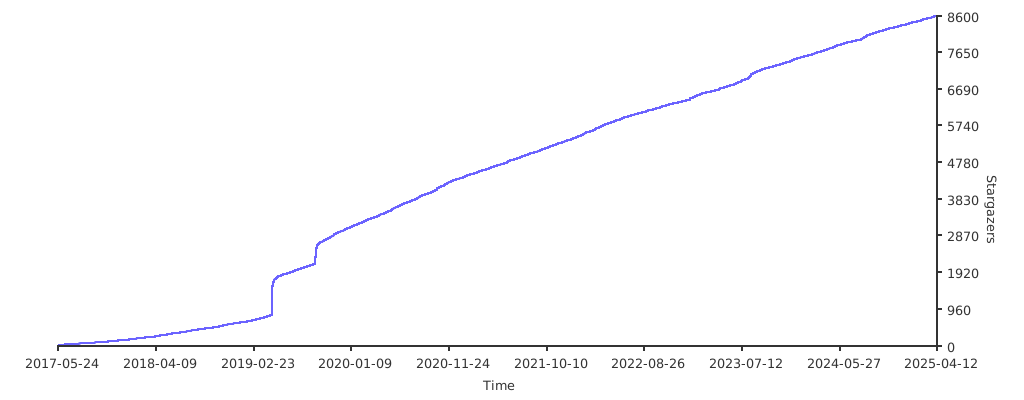
Stars over time
License
Apache 2.0 License, please see LICENSE for details.