litedb-org / LiteDB
LiteDB - A .NET NoSQL Document Store in a single data file
AI Architecture Analysis
This repository is indexed by RepoMind. By analyzing litedb-org/LiteDB in our AI interface, you can instantly generate complete architecture diagrams, visualize control flows, and perform automated security audits across the entire codebase.
Our Agentic Context Augmented Generation (Agentic CAG) engine loads full source files into context, avoiding the fragmentation of traditional RAG systems. Ask questions about the architecture, dependencies, or specific features to see it in action.
Embed this Badge
Showcase RepoMind's analysis directly in your repository's README.

Repository Summary (README)
PreviewLiteDB - A .NET NoSQL Document Store in a single data file




LiteDB is a small, fast and lightweight .NET NoSQL embedded database.
- Serverless NoSQL Document Store
- Simple API, similar to MongoDB
- 100% C# code for .NET 4.5 / NETStandard 1.3/2.0 in a single DLL (less than 450kb)
- Thread-safe
- ACID with full transaction support
- Data recovery after write failure (WAL log file)
- Datafile encryption using DES (AES) cryptography
- Map your POCO classes to
BsonDocumentusing attributes or fluent mapper API - Store files and stream data (like GridFS in MongoDB)
- Single data file storage (like SQLite)
- Index document fields for fast search
- LINQ support for queries
- SQL-Like commands to access/transform data
- LiteDB Studio - Nice UI for data access
- Open source and free for everyone - including commercial use
- Install from NuGet:
Install-Package LiteDB
New v5
- New storage engine
- No locks for
readoperations (multiple readers) Writelocks per collection (multiple writers)- Internal/System collections
- New
SQL-Like Syntax - New query engine (support projection, sort, filter, query)
- Partial document load (root level)
- and much, much more!
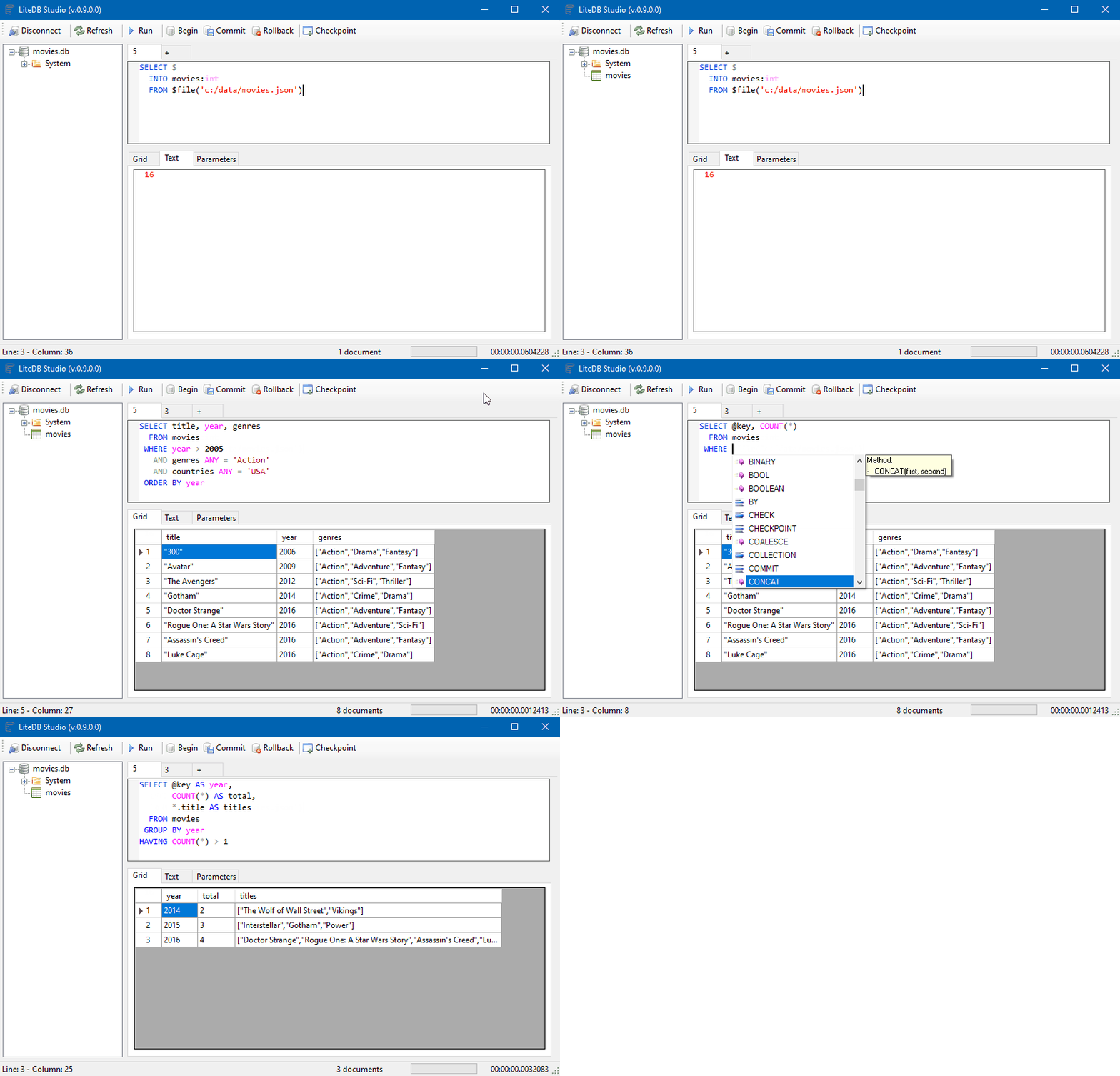
Lite.Studio
New UI to manage and visualize your database:
Documentation
Visit the Wiki for full documentation. For simplified chinese version, check here.
LiteDB Community
Help LiteDB grow its user community by answering this simple survey
How to use LiteDB
A quick example for storing and searching documents:
// Create your POCO class
public class Customer
{
    public int Id { get; set; }
    public string Name { get; set; }
    public int Age { get; set; }
    public string[] Phones { get; set; }
    public bool IsActive { get; set; }
}

// Open database (or create if doesn't exist)
using(var db = new LiteDatabase(@"MyData.db"))
{
    // Get customer collection
    var col = db.GetCollection<Customer>("customers");

    // Create your new customer instance
    var customer = new Customer
    {
        Name = "John Doe",
        Phones = new string[] { "8000-0000", "9000-0000" },
        Age = 39,
        IsActive = true
    };

    // Create unique index in Name field
    col.EnsureIndex(x => x.Name, true);

    // Insert new customer document (Id will be auto-incremented)
    col.Insert(customer);

    // Update a document inside a collection
    customer.Name = "Joana Doe";

    col.Update(customer);

    // Use LINQ to query documents (with no index)
    var results = col.Find(x => x.Age > 20);
}
Using fluent mapper and cross document reference for more complex data models
// DbRef to cross references
public class Order
{
    public ObjectId Id { get; set; }
    public DateTime OrderDate { get; set; }
    public Address ShippingAddress { get; set; }
    public Customer Customer { get; set; }
    public List<Product> Products { get; set; }
}

// Re-use mapper from global instance
var mapper = BsonMapper.Global;

// "Products" and "Customer" are from other collections (not embedded document)
mapper.Entity<Order>()
    .DbRef(x => x.Customer, "customers")   // 1 to 1/0 reference
    .DbRef(x => x.Products, "products")    // 1 to Many reference
    .Field(x => x.ShippingAddress, "addr"); // Embedded sub document

using(var db = new LiteDatabase("MyOrderDatafile.db"))
{
    var orders = db.GetCollection<Order>("orders");

    // When query Order, includes references
    var query = orders
        .Include(x => x.Customer)
        .Include(x => x.Products) // 1 to many reference
        .Find(x => x.OrderDate <= DateTime.Now);

    // Each instance of Order will load Customer/Products references
    foreach(var order in query)
    {
        var name = order.Customer.Name;
        ...
    }
}
Where to use?
- Desktop/local small applications
- Application file format
- Small web sites/applications
- One database per account/user data store
Plugins
- A GUI viewer tool: https://github.com/falahati/LiteDBViewer (v4)
- A GUI editor tool: https://github.com/JosefNemec/LiteDbExplorer (v4)
- Lucene.NET directory: https://github.com/sheryever/LiteDBDirectory
- LINQPad support: https://github.com/adospace/litedbpad
- F# Support: https://github.com/Zaid-Ajaj/LiteDB.FSharp (v4)
- UltraLiteDB (for Unity or IOT): https://github.com/rejemy/UltraLiteDB
- OneBella - cross platform (windows, macos, linux) GUI tool : https://github.com/namigop/OneBella
- LiteDB.Migration: Framework that makes schema migrations easier: https://github.com/JKamsker/LiteDB.Migration/
Changelog
Change details for each release are documented in the release notes.
Code Signing
LiteDB is digitally signed courtesy of SignPath
<a href="https://www.signpath.io"> <img src="https://about.signpath.io/assets/signpath-logo.svg" width="150"> </a>