mcmilk / 7-Zip-zstd
7-Zip with support for Brotli, Fast-LZMA2, Lizard, LZ4, LZ5 and Zstandard
AI Architecture Analysis
This repository is indexed by RepoMind. By analyzing mcmilk/7-Zip-zstd in our AI interface, you can instantly generate complete architecture diagrams, visualize control flows, and perform automated security audits across the entire codebase.
Our Agentic Context Augmented Generation (Agentic CAG) engine loads full source files into context, avoiding the fragmentation of traditional RAG systems. Ask questions about the architecture, dependencies, or specific features to see it in action.
Embed this Badge
Showcase RepoMind's analysis directly in your repository's README.

Repository Summary (README)
PreviewREADME
This is the Github Page of 7-Zip ZS with support of additional Codecs. The library used therefore is located here: Multithreading Library
You can install it in two ways:
- complete setup with additions within the GUI and a modified Explorer context menu
- only the codec plugin that goes to your existing 7-Zip installation (no GUI changes and no additional Hashers)
Status


Codec overview
-
Zstandard v1.5.7 is a real-time compression algorithm, providing high compression ratios. It offers a very wide range of compression / speed trade-off, while being backed by a very fast decoder.
- Levels: 1..22
-
Brotli v.1.2.0 is a generic-purpose lossless compression algorithm that compresses data using a combination of a modern variant of the LZ77 algorithm, Huffman coding and 2nd order context modeling, with a compression ratio comparable to the best currently available general-purpose compression methods. It is similar in speed with deflate but offers more dense compression.
- Levels: 0..11
-
LZ4 v1.10.0 is lossless compression algorithm, providing compression speed at 400 MB/s per core (0.16 Bytes/cycle). It features an extremely fast decoder, with speed in multiple GB/s per core (0.71 Bytes/cycle). A high compression derivative, called LZ4_HC, is available, trading customizable CPU time for compression ratio.
- Levels: 1..12
-
LZ5 v1.5 is a modification of LZ4 which was meant for a better ratio at cost of slower compression and decompression. It's superseded by Lizard now.
- Levels: 1..15
-
Lizard v2.1 is an efficient compressor with fast decompression. It achieves compression ratio that is comparable to zip/zlib and zstd/brotli (at low and medium compression levels) at decompression speed of 1000 MB/s and faster.
- Levels 10..19 (fastLZ4) are designed to give about 10% better decompression speed than LZ4
- Levels 20..29 (LIZv1) are designed to give better ratio than LZ4 keeping 75% decompression speed
- Levels 30..39 (fastLZ4 + Huffman) adds Huffman coding to fastLZ4
- Levels 40..49 (LIZv1 + Huffman) give the best ratio, comparable to zlib and low levels of zstd/brotli, but with a faster decompression speed
-
Fast LZMA2 v1.0.1 is a LZMA2 compression algorithm, 20% to 100% faster than normal LZMA2 at levels 5 and above, but with a slightly lower compression ratio. It uses a parallel buffered radix matchfinder and some optimizations from Zstandard. The codec uses much less additional memory per thread than standard LZMA2.
- Levels: 1..9
7-Zip ZS CLI variants
7z and 7zz provide largely the same core 7‑Zip functionality, but they are built/distributed differently (plugin-capable vs. standalone), which can affect available formats/codecs.
| Binary | Description |
|---|---|
7z | Full 7‑Zip command-line tool which loads it's modules/codecs via 7z.so. |
7zz | Official standalone 7‑Zip binary used on Linux/macOS packages - no external plugins via 7z.so. |
7za | Standalone executable which supports fewer archive formats than 7z. (Minimal + LZ4 and Hashes) |
7zr | Minimal "light" standalone executable focused on the 7z format. (FLZMA2, Zstd) |
7-Zip Zstandard Edition (full setup, with GUI and Explorer integration)
Installation (via setup)
- download the setup from here 7-Zip ZS Releases
- install it, like the default 7-Zip one
- you may check, if the 7-Zip can deal with Zstandard or other codecs via this command:
7z.exe i
The output should look like this:
7-Zip 25.01 ZS v1.5.7 (x64) : Copyright (c) 1999- Igor Pavlov, 2016- Tino Reichardt, 2022- Sergey G. Brester : 2025-08-06

Libs:
 0  c:\Program Files\7-Zip-Zstandard\7z.dll
 1  C:\Program Files\7-Zip-Zstandard\Codecs\Iso7z.64.dll

Formats:
...
 0 CK            xz       xz txz (.tar) FD 7 z X Z 00
 0               Z        z taz (.tar)  1F 9D
 0 CK            zstd     zst zstd tzst (.tar) tzstd (.tar) 0 x F D 2 F B 5 2 5 . . 0 x F D 2 F B 5 2 8 00
 0 C   F         7z       7z            7 z BC AF ' 1C
 0     F         Cab      cab           M S C F 00 00 00 00
...

Codecs:
 0 4ED   303011B BCJ2
 0  EDF  3030103 BCJ
 0  EDF  3030205 PPC
 0  EDF  3030401 IA64
 0  EDF  3030501 ARM
 0  EDF  3030701 ARMT
 0  EDF  3030805 SPARC
 0  EDF    20302 Swap2
 0  EDF    20304 Swap4
 0  ED     40202 BZip2
 0  ED         0 Copy
 0  ED     40109 Deflate64
 0  ED     40108 Deflate
 0  EDF        3 Delta
 0  ED        21 LZMA2
 0  ED     30101 LZMA
 0  ED     30401 PPMD
 0   D     40301 Rar1
 0   D     40302 Rar2
 0   D     40303 Rar3
 0   D     40305 Rar5
 0  ED   4F71102 BROTLI
 0  ED   4F71104 LZ4
 0  ED   4F71106 LIZARD
 0  ED   4F71105 LZ5
 0  ED   4F71101 ZSTD
 0  ED        21 FLZMA2
 0  EDF  6F10701 7zAES
 0  EDF  6F00181 AES256CBC

Hashers:
 0   32      202 BLAKE2sp
 0   32      204 BLAKE3
 0    4        1 CRC32
 0    8        4 CRC64
 0   16      205 MD2
 0   16      206 MD4
 0   16      207 MD5
 0   20      201 SHA1
 0   32        A SHA256
 0   48      208 SHA384
 0   64      209 SHA512
 0   32      20A SHA3-256
 0   48      20B SHA3-384
 0   64      20C SHA3-512
 0    4      20D XXH32
 0    8      20E XXH64
My Antivirus X.Y or Virustotal.com say it's malware/virus
In summaray: It's not maleware - but it's not my job to chase after these (snake oil manufacturers)[https://en.wikipedia.org/wiki/Snake_oil].
In detail: you can verify for yourself that the release downloads are generated on the fly by GitHub Actions on this Microsoft-owned platform. If there really were any viruses, they would be generated by machines running in Microsoft data centers 😉
For example, for the released version v25.01-v1.5.7-R4:
- it's the one with tag
v25.01-v1.5.7-R4 - click on Adjust Blake3 MAX_SIMD_DEGREE
- scroll down to the Artifacts section
- all the windows binaries are within this ZIP file:
7-Zip ZS Release binaries.zip - check if the SHA256 hashsums are the same as the files of the release
I started a list of false positive issues with issue #451. Please don’t open a new issue. Instead, contact the antivirus vendor and ask them to remove this false positive.
Usage and features of the full installation
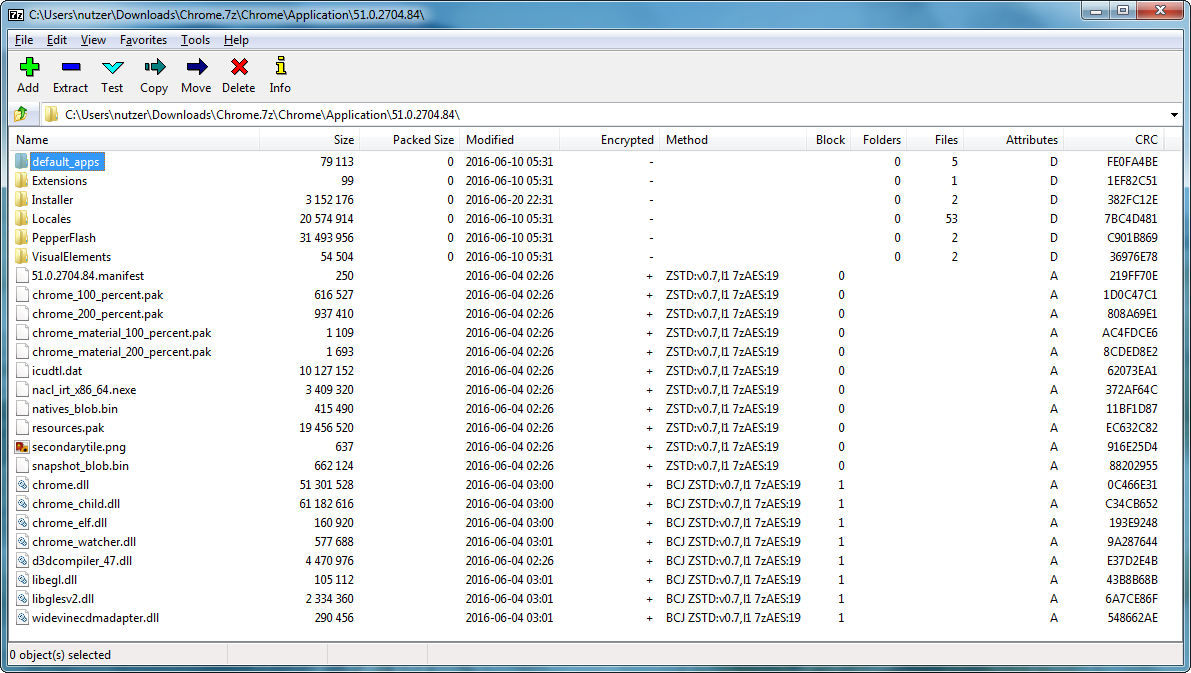
- compression and decompression for Brotli, Lizard, LZ4, LZ5 and Zstandard within the 7-Zip container format
- compression and decompression of Brotli (
.br), Lizard (.liz), LZ4 (.lz4), LZ5 (.lz5) and Zstandard (.zst) files - handling of ZIP files with Zstandard compression
- included lzip decompression support, patch from: https://download.savannah.gnu.org/releases/lzip/7zip/
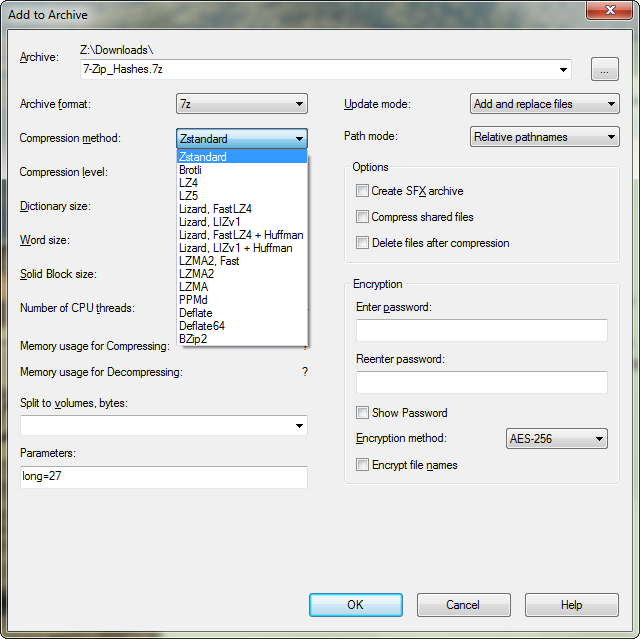
- explorer context menu: "Add to xy.7z" will use all parameters of the last "Add to Archive" compression dialog (this includes: method, level, dictionary, blocksize, threads and paramters input box)
- squashfs files with LZ4 or Zstandard compression can be handled
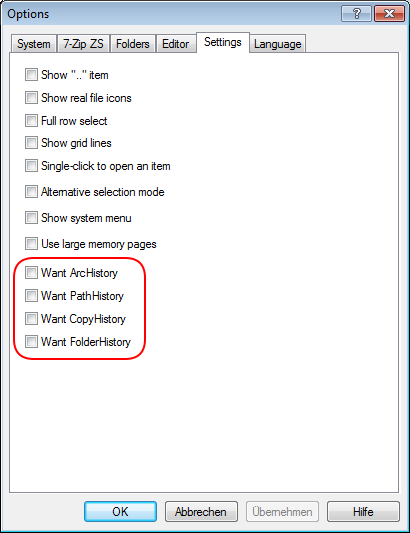
- several history settings aren't stored by default, look here for some info about that, you can restore original 7-Zip behavior via
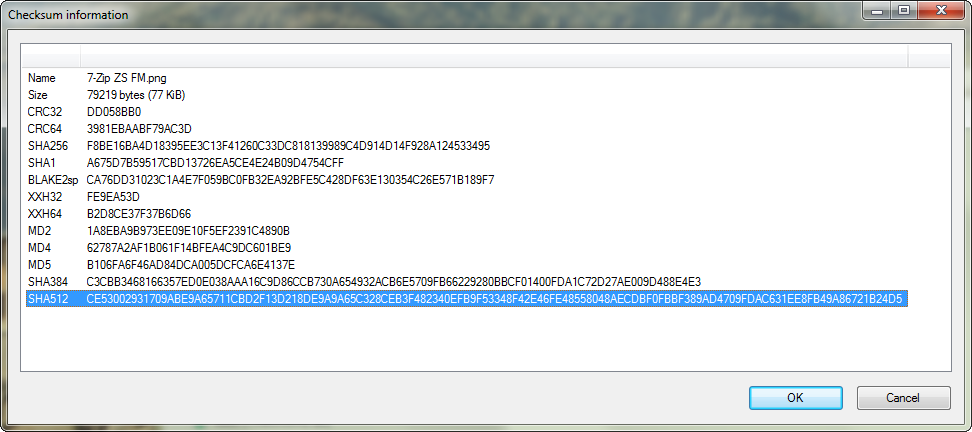
tools->options->settings - these hashes can be calculated: CRC32, CRC64, MD2, MD4, MD5, SHA1, SHA256, SHA384, SHA512, SHA3-256, SHA3-384, SHA3-512, XXH32, XXH64, BLAKE2sp, BLAKE3 (lowercase or uppercase)
7z a archiv.7z -m0=zstd -mx0   Zstandard Fastest Mode, without BCJ preprocessor
7z a archiv.7z -m0=zstd -mx1   Zstandard Fast mode, with BCJ preprocessor on executables
7z a archiv.7z -m0=zstd -mx..  ...
7z a archiv.7z -m0=zstd -mx21  Zstandard 2nd Slowest Mode, with BCJ preprocessor on executables
7z a archiv.7z -m0=zstd -mx22  Zstandard Ultra Mode, with BCJ preprocessor on executables

7z a archiv.7z -m0=lz4 -mx0   LZ4 Fastest Mode, without BCJ preprocessor
7z a archiv.7z -m0=lz4 -mx1   LZ4 Fast mode, with BCJ preprocessor on executables
7z a archiv.7z -m0=lz4 -mx..  ...
7z a archiv.7z -m0=lz4 -mx12  LZ4 Ultra Mode, with BCJ preprocessor on executables

7z a archiv.7z -m0=lz5 -mx0   LZ5 Version 1.5 Fastest Mode, without BCJ preprocessor
7z a archiv.7z -m0=lz5 -mx1   LZ5 Version 1.5 Fast mode, with BCJ preprocessor on executables
7z a archiv.7z -m0=lz5 -mx..  ...
7z a archiv.7z -m0=lz5 -mx16  LZ5 Version 1.5 Ultra Mode, with BCJ preprocessor on executables

7z a archiv.7z -m0=flzma2 -mx1   Fast LZMA2 Fastest mode, with BCJ preprocessor on executables
7z a archiv.7z -m0=flzma2 -mx..  ...
7z a archiv.7z -m0=flzma2 -mx9   Fast LZMA2 Ultra Mode, with BCJ preprocessor on executables

7z x -so test.tar.zst | 7z l -si -ttar
-> show contents of zstd compressed tar archive test.tar.zst

7z x -so test.tar.lz | 7z l -si -ttar
-> show contents of lzip compressed tar archive test.tar.lz

Zstandard codec Plugin for Mainline 7-Zip
Installation (via plugin)
- download the
Codecs.7zarchive from here 7-Zip ZS Releases, this archive holds binaries, which are compatible with the Mainline version of 7-Zip - create a new directory named
Codecsand put in there the zstd-x32.dll or the zstd-x64.dll, depending on your 7-Zip installation- normally, the x32 should go to: "C:\Program Files (x86)\7-Zip\Codecs"
- the x64 version should go in here: "C:\Program Files\7-Zip\Codecs"
- you could also replace the
7z.dlldirectly withinC:\Program Files (x86)\7-Zip - then you may check if the dll is correctly installed via this command:
7z.exe i
The output should look like this:
7-Zip 21.03 (x64) : Copyright (c) 1999-2021 Igor Pavlov : 2021-05-06

Libs:
 0  C:\Program Files\7-Zip\7z.dll

Libs:
 0  c:\Program Files\7-Zip\7z.dll
 1  c:\Program Files\7-Zip\Codecs\brotli-x64.dll
 2  c:\Program Files\7-Zip\Codecs\flzma2-x64.dll
 3  c:\Program Files\7-Zip\Codecs\lizard-x64.dll
 4  c:\Program Files\7-Zip\Codecs\lz4-x64.dll
 5  c:\Program Files\7-Zip\Codecs\lz5-x64.dll
 6  c:\Program Files\7-Zip\Codecs\zstd-x64.dll

...

Codecs:
 0 4ED  303011B BCJ2
 0  ED  3030103 BCJ
 0  ED  3030205 PPC
 0  ED  3030401 IA64
 0  ED  3030501 ARM
 0  ED  3030701 ARMT
 0  ED  3030805 SPARC
 0  ED    20302 Swap2
 0  ED    20304 Swap4
 0  ED    40202 BZip2
 0  ED        0 Copy
 0  ED    40109 Deflate64
 0  ED    40108 Deflate
 0  ED        3 Delta
 0  ED       21 LZMA2
 0  ED    30101 LZMA
 0  ED    30401 PPMD
 0   D    40301 Rar1
 0   D    40302 Rar2
 0   D    40303 Rar3
 0   D    40305 Rar5
 0  ED  6F10701 7zAES
 0  ED  6F00181 AES256CBC
 1  ED  4F71102 BROTLI
 2  ED       21 FLZMA2
 3  ED  4F71106 LIZARD
 4  ED  4F71104 LZ4
 5  ED  4F71105 LZ5
 6  ED  4F71101 ZSTD
Usage (codec plugin)
- compression and decompression for Brotli, Fast LZMA2, Lizard, LZ4, LZ5 and Zstandard within the 7-Zip container format
- you can only create
.7zfiles, the files like.lz4,.lz5and.zstare not covered by the plugins - when compressing binaries (*.exe, *.dll), you have to explicitly disable the bcj2 filter via
-m0=bcj, when using only the plugin dll's - so the usage should look like this:
7z a archiv.7z -m0=bcj -m1=zstd -mx1   Fast mode, with BCJ preprocessor on executables
7z a archiv.7z -m0=bcj -m1=zstd -mx..  ...
7z a archiv.7z -m0=bcj -m1=zstd -mx21  2nd Slowest Mode, with BCJ preprocessor on executables
7z a archiv.7z -m0=bcj -m1=zstd -mx22  Ultra Mode, with BCJ preprocessor on executables
7z a archiv.7z -m0=bcj -m1=brotli -mxN  ...
7z a archiv.7z -m0=bcj -m1=lizard -mxN  ...
7z a archiv.7z -m0=bcj -m1=lz4 -mxN  ...
7z a archiv.7z -m0=bcj -m1=lz5 -mxN  ...
7z a archiv.7z -m0=bcj -m1=flzma2 -mxN  ...
Codec Plugin for Total Commander
There is no dedicated plugin for Total Commander anymore,
and it seems that the files tc7z.dll and tc7z64.dll cannot simply be replaced at the moment.
Codec Plugin for Far Manager
- copy the
7z.dllfile fromC:\Program Files\7-Zip-Zstandard\7z.dlltoC:\Program Files\Far Manager\Plugins\ArcLite\7z.dll - then restart the Far manager - and on next start, you will have support for 7-Zip Zstandard archives ;-)
Benchmarks
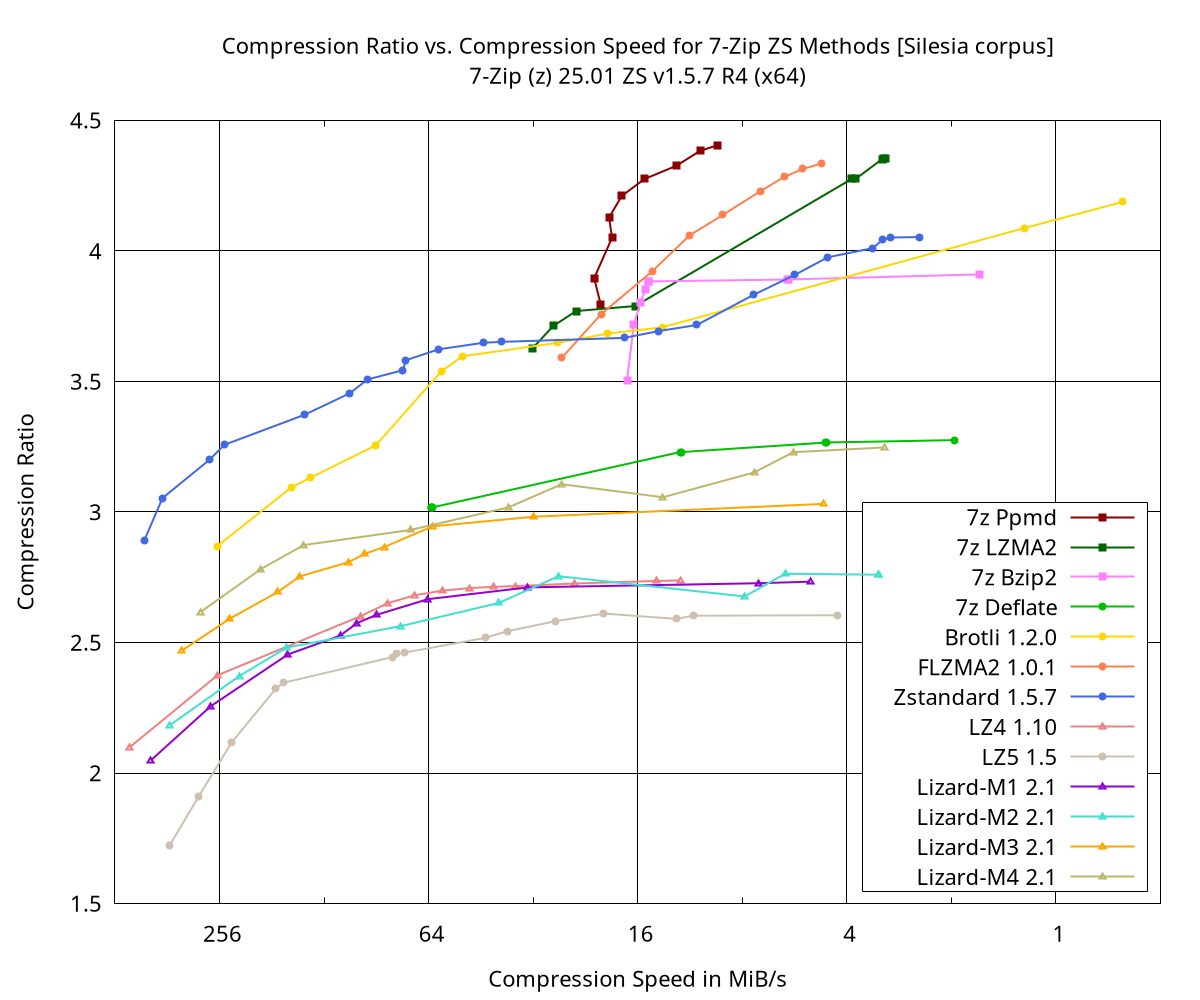
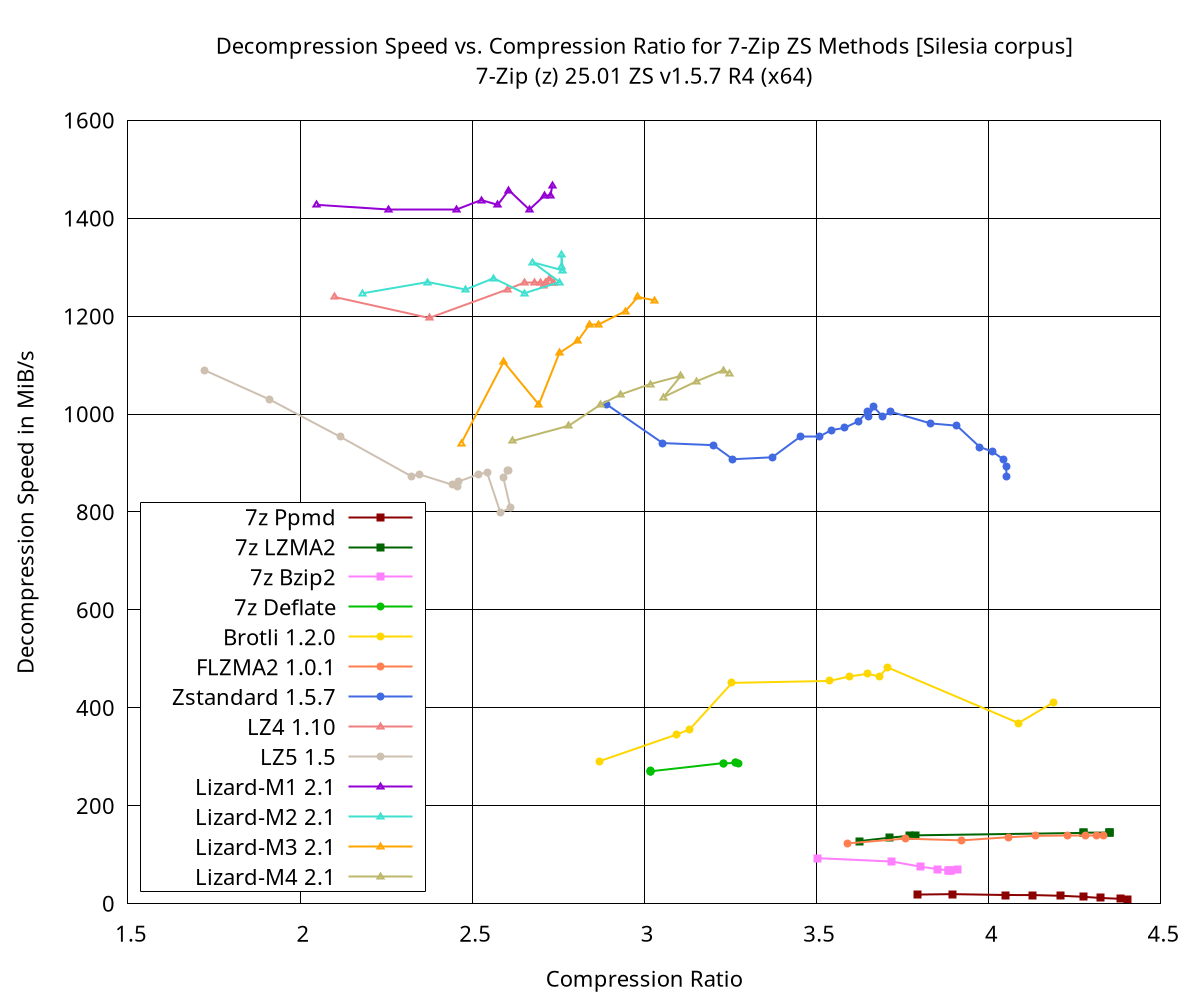
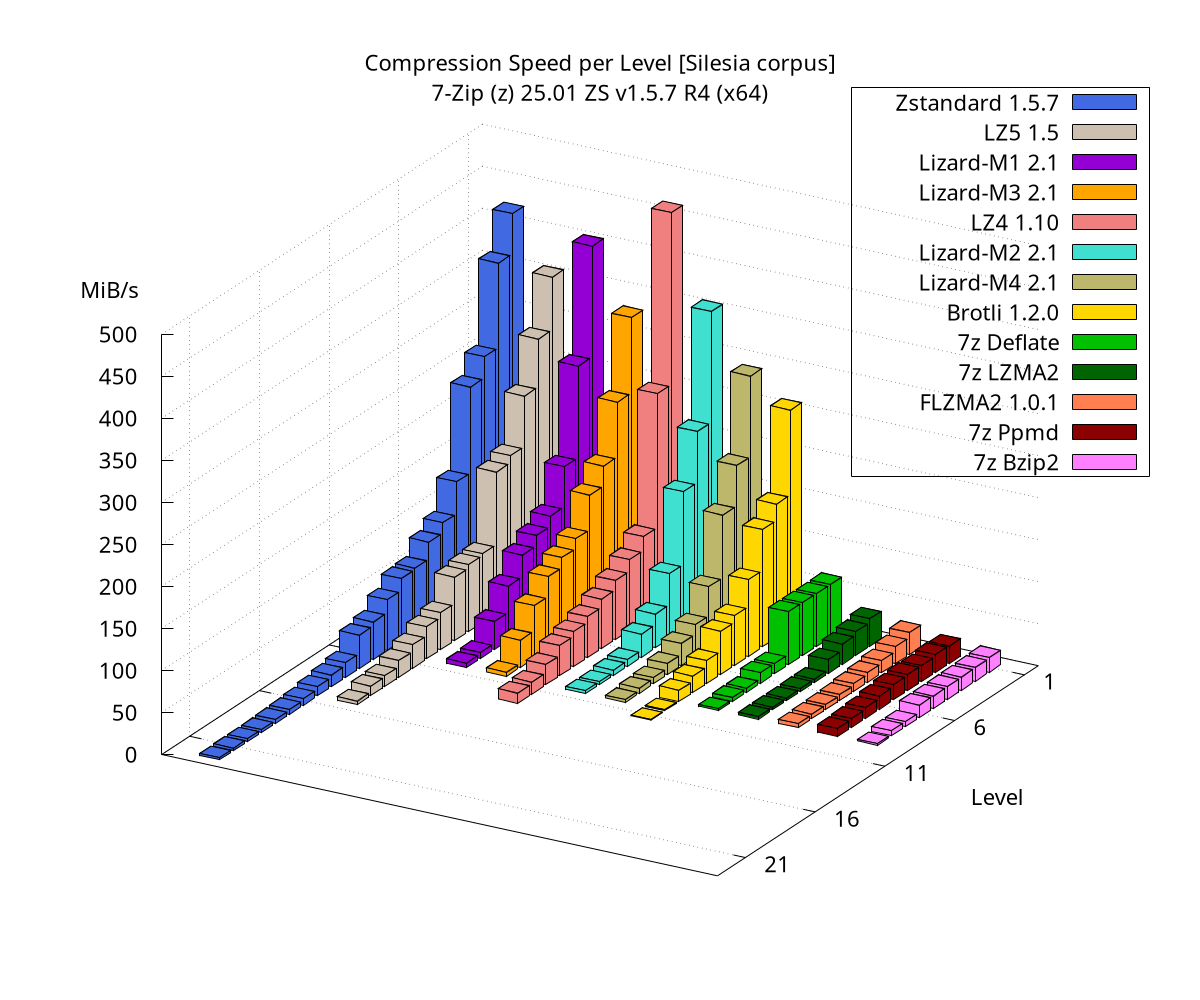
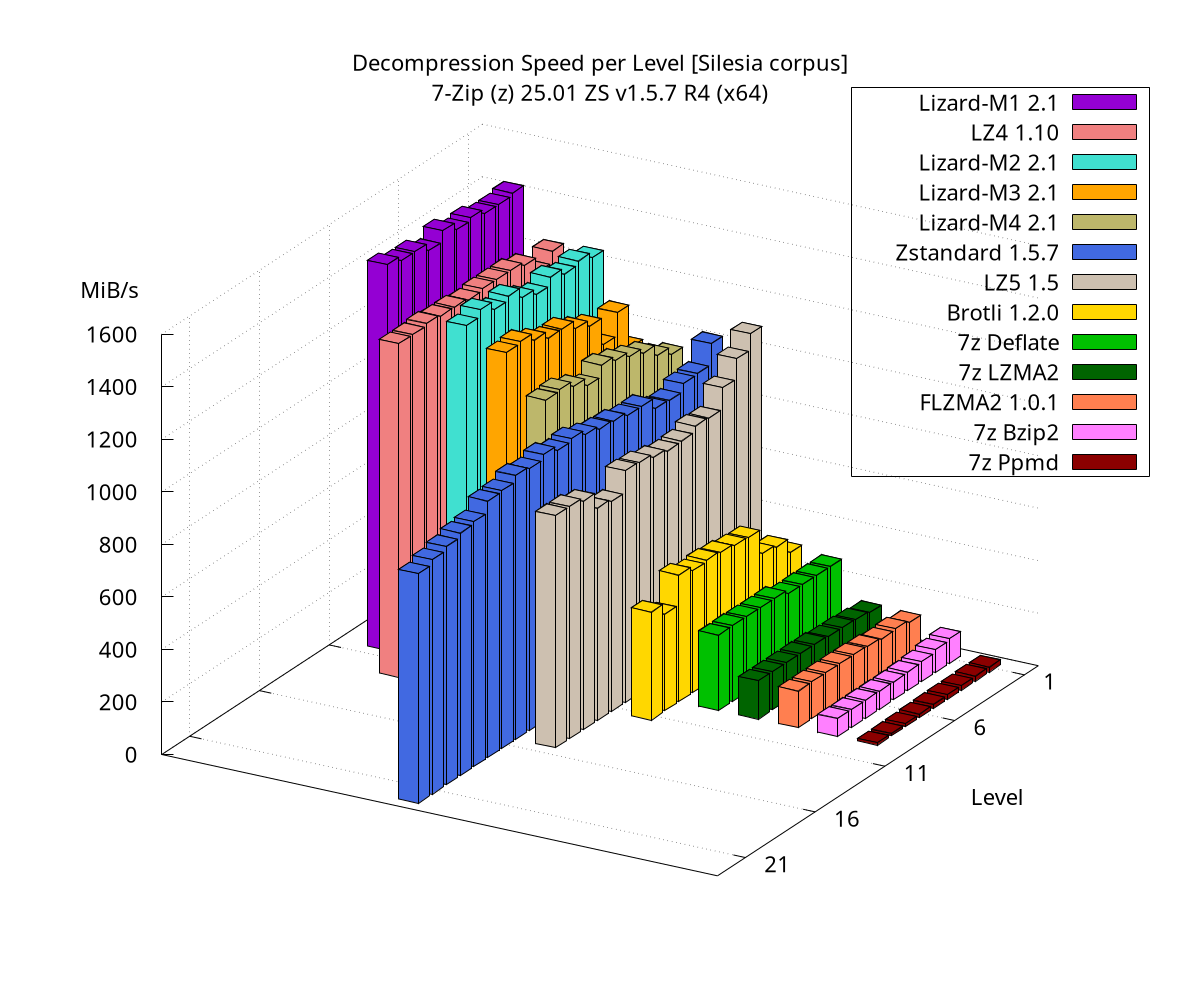
For benchmarking, I started using the Linux binary 7zz in 2026.
The test system is an idle Dell PowerEdge R6615 with the following hardware:
- CPU: AMD EPYC 9354P (32 cores)
- Memory: 128 GB DDR5 (8x 16GB)
- OS: AlmaLinux 9 (x86_64)
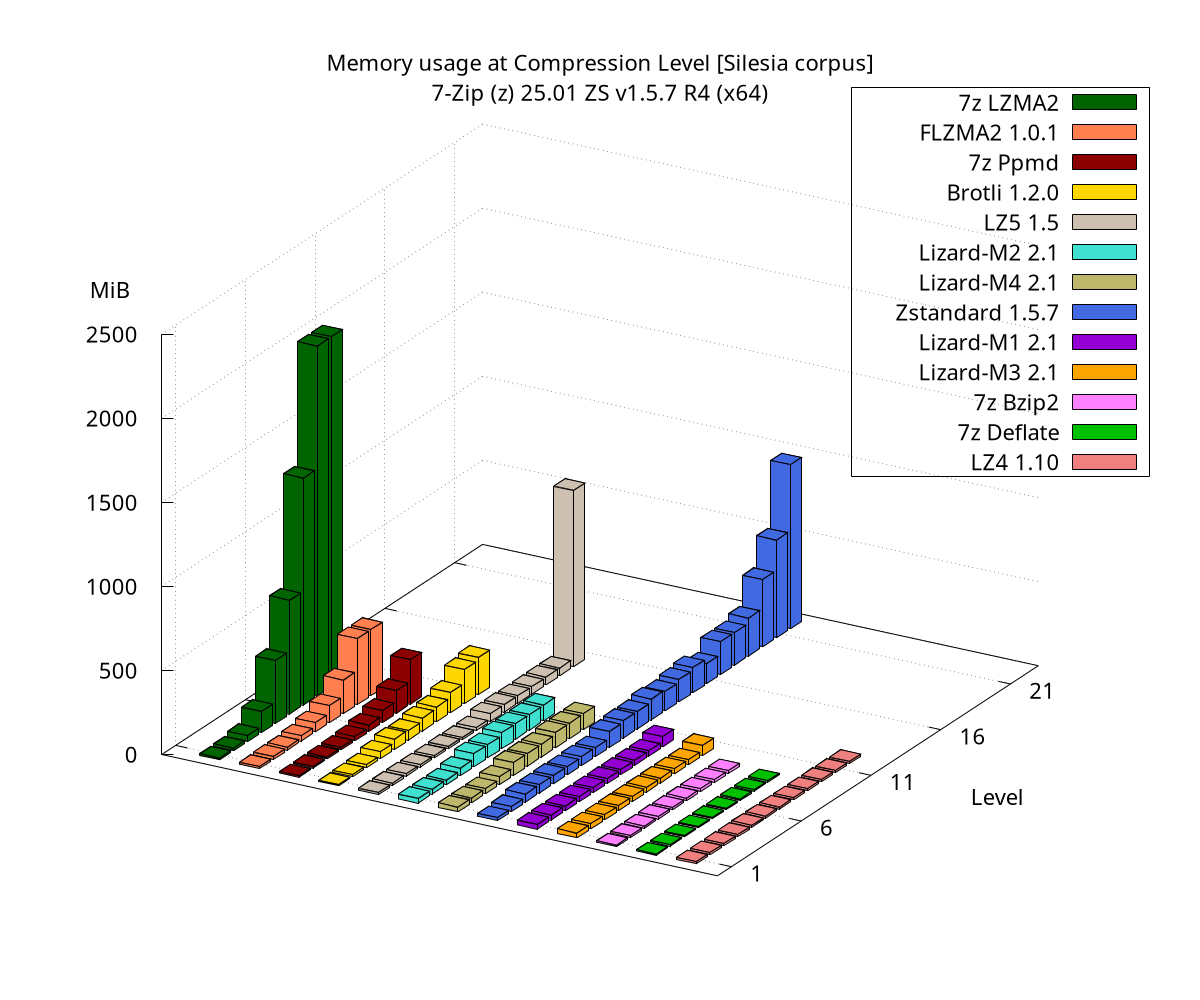
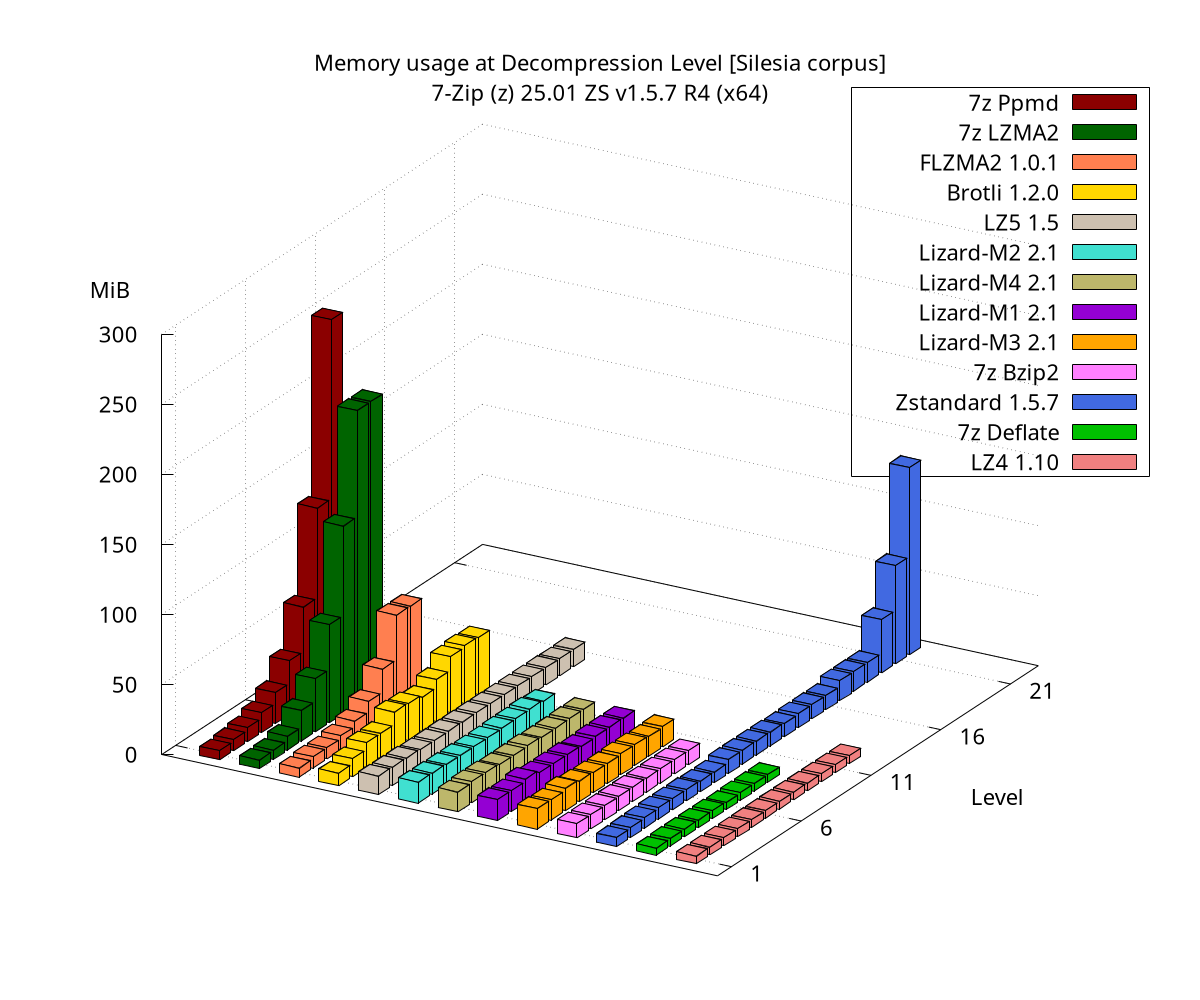
For the tests, the Silesia compression corpus is used.
Compression tests are performed by running a single-threaded compression for each method: 7z a test.7z -mmt=1 -m0=MethodX.
Decompression is tested on the freshly created archive using: 7z t test.7z.
Memory usage and execution times are measured using a modified GNU time.
The benchmarks themselves are executed via a shell script.
Results:
Themes
- FileManager Toolbar Icon Theme: Glyfz 2016 by AlexGal homepage
- File Types Icon Theme: Windows 10 by masamunecyrus homepage
- Additional icons file types created by Mr4Mike4 homepage
- Dark mode support via darkmodelib (v0.47.0) by ozone10 homepage
License and Redistribution
- The same as the Mainline 7-Zip, which means most of the code is GNU LGPL v2.1-or-later
- Read COPYING for more details
Links
- 7-Zip Homepage
- 7-Zip Zstandard Homepage
- Request for inclusion into the mainline 7-Zip:
- result, will currently not included :(
- p7zip Homepage - for Linux and MacOS with LZ4 and Zstandard
Donate
You find this project useful, maybe you consider a donation ;-)

Version Information
- 7-Zip ZS Version 25.01 - Release 4
/TR 2026-01-10
Notes
- if you want an code signed installer, you need to donate sth.