ultralytics / yolov5
YOLOv5 🚀 in PyTorch > ONNX > CoreML > TFLite
AI Architecture Analysis
This repository is indexed by RepoMind. By analyzing ultralytics/yolov5 in our AI interface, you can instantly generate complete architecture diagrams, visualize control flows, and perform automated security audits across the entire codebase.
Our Agentic Context Augmented Generation (Agentic CAG) engine loads full source files into context, avoiding the fragmentation of traditional RAG systems. Ask questions about the architecture, dependencies, or specific features to see it in action.
Embed this Badge
Showcase RepoMind's analysis directly in your repository's README.

Repository Summary (README)
Preview中文 | 한국어 | 日本語 | Русский | Deutsch | Français | Español | Português | Türkçe | Tiếng Việt | العربية
<div> <a href="https://github.com/ultralytics/yolov5/actions/workflows/ci-testing.yml"><img src="https://github.com/ultralytics/yolov5/actions/workflows/ci-testing.yml/badge.svg" alt="YOLOv5 CI Testing"></a> <a href="https://hub.docker.com/r/ultralytics/yolov5"><img src="https://img.shields.io/docker/pulls/ultralytics/yolov5?logo=docker" alt="Docker Pulls"></a> <a href="https://discord.com/invite/ultralytics"><img alt="Discord" src="https://img.shields.io/discord/1089800235347353640?logo=discord&logoColor=white&label=Discord&color=blue"></a> <a href="https://community.ultralytics.com/"><img alt="Ultralytics Forums" src="https://img.shields.io/discourse/users?server=https%3A%2F%2Fcommunity.ultralytics.com&logo=discourse&label=Forums&color=blue"></a> <a href="https://www.reddit.com/r/ultralytics/"><img alt="Ultralytics Reddit" src="https://img.shields.io/reddit/subreddit-subscribers/ultralytics?style=flat&logo=reddit&logoColor=white&label=Reddit&color=blue"></a> <br> <a href="https://bit.ly/yolov5-paperspace-notebook"><img src="https://assets.paperspace.io/img/gradient-badge.svg" alt="Run on Gradient"></a> <a href="https://colab.research.google.com/github/ultralytics/yolov5/blob/master/tutorial.ipynb"><img src="https://colab.research.google.com/assets/colab-badge.svg" alt="Open In Colab"></a> <a href="https://www.kaggle.com/models/ultralytics/yolov5"><img src="https://kaggle.com/static/images/open-in-kaggle.svg" alt="Open In Kaggle"></a> </div> <br>Ultralytics YOLOv5 🚀 is a cutting-edge, state-of-the-art (SOTA) computer vision model developed by Ultralytics. Based on the PyTorch framework, YOLOv5 is renowned for its ease of use, speed, and accuracy. It incorporates insights and best practices from extensive research and development, making it a popular choice for a wide range of vision AI tasks, including object detection, image segmentation, and image classification.
We hope the resources here help you get the most out of YOLOv5. Please browse the YOLOv5 Docs for detailed information, raise an issue on GitHub for support, and join our Discord community for questions and discussions!
To request an Enterprise License, please complete the form at Ultralytics Licensing.
<div align="center"> <a href="https://github.com/ultralytics"><img src="https://github.com/ultralytics/assets/raw/main/social/logo-social-github.png" width="2%" alt="Ultralytics GitHub"></a> <img src="https://github.com/ultralytics/assets/raw/main/social/logo-transparent.png" width="2%" alt="space"> <a href="https://www.linkedin.com/company/ultralytics/"><img src="https://github.com/ultralytics/assets/raw/main/social/logo-social-linkedin.png" width="2%" alt="Ultralytics LinkedIn"></a> <img src="https://github.com/ultralytics/assets/raw/main/social/logo-transparent.png" width="2%" alt="space"> <a href="https://twitter.com/ultralytics"><img src="https://github.com/ultralytics/assets/raw/main/social/logo-social-twitter.png" width="2%" alt="Ultralytics Twitter"></a> <img src="https://github.com/ultralytics/assets/raw/main/social/logo-transparent.png" width="2%" alt="space"> <a href="https://youtube.com/ultralytics?sub_confirmation=1"><img src="https://github.com/ultralytics/assets/raw/main/social/logo-social-youtube.png" width="2%" alt="Ultralytics YouTube"></a> <img src="https://github.com/ultralytics/assets/raw/main/social/logo-transparent.png" width="2%" alt="space"> <a href="https://www.tiktok.com/@ultralytics"><img src="https://github.com/ultralytics/assets/raw/main/social/logo-social-tiktok.png" width="2%" alt="Ultralytics TikTok"></a> <img src="https://github.com/ultralytics/assets/raw/main/social/logo-transparent.png" width="2%" alt="space"> <a href="https://ultralytics.com/bilibili"><img src="https://github.com/ultralytics/assets/raw/main/social/logo-social-bilibili.png" width="2%" alt="Ultralytics BiliBili"></a> <img src="https://github.com/ultralytics/assets/raw/main/social/logo-transparent.png" width="2%" alt="space"> <a href="https://discord.com/invite/ultralytics"><img src="https://github.com/ultralytics/assets/raw/main/social/logo-social-discord.png" width="2%" alt="Ultralytics Discord"></a> </div> </div> <br>🚀 YOLO11: The Next Evolution
We are excited to announce the launch of Ultralytics YOLO11 🚀, the latest advancement in our state-of-the-art (SOTA) vision models! Available now at the Ultralytics YOLO GitHub repository, YOLO11 builds on our legacy of speed, precision, and ease of use. Whether you're tackling object detection, instance segmentation, pose estimation, image classification, or oriented object detection (OBB), YOLO11 delivers the performance and versatility needed to excel in diverse applications.
Get started today and unlock the full potential of YOLO11! Visit the Ultralytics Docs for comprehensive guides and resources:


# Install the ultralytics package
pip install ultralytics
📚 Documentation
See the YOLOv5 Docs for full documentation on training, testing, and deployment. See below for quickstart examples.
<details open> <summary>Install</summary>Clone the repository and install dependencies in a Python>=3.8.0 environment. Ensure you have PyTorch>=1.8 installed.
# Clone the YOLOv5 repository
git clone https://github.com/ultralytics/yolov5

# Navigate to the cloned directory
cd yolov5

# Install required packages
pip install -r requirements.txt
Use YOLOv5 via PyTorch Hub for inference. Models are automatically downloaded from the latest YOLOv5 release.
import torch

# Load a YOLOv5 model (options: yolov5n, yolov5s, yolov5m, yolov5l, yolov5x)
model = torch.hub.load("ultralytics/yolov5", "yolov5s")  # Default: yolov5s

# Define the input image source (URL, local file, PIL image, OpenCV frame, numpy array, or list)
img = "https://ultralytics.com/images/zidane.jpg"  # Example image

# Perform inference (handles batching, resizing, normalization automatically)
results = model(img)

# Process the results (options: .print(), .show(), .save(), .crop(), .pandas())
results.print()  # Print results to console
results.show()  # Display results in a window
results.save()  # Save results to runs/detect/exp
The detect.py script runs inference on various sources. It automatically downloads models from the latest YOLOv5 release and saves the results to the runs/detect directory.
# Run inference using a webcam
python detect.py --weights yolov5s.pt --source 0

# Run inference on a local image file
python detect.py --weights yolov5s.pt --source img.jpg

# Run inference on a local video file
python detect.py --weights yolov5s.pt --source vid.mp4

# Run inference on a screen capture
python detect.py --weights yolov5s.pt --source screen

# Run inference on a directory of images
python detect.py --weights yolov5s.pt --source path/to/images/

# Run inference on a text file listing image paths
python detect.py --weights yolov5s.pt --source list.txt

# Run inference on a text file listing stream URLs
python detect.py --weights yolov5s.pt --source list.streams

# Run inference using a glob pattern for images
python detect.py --weights yolov5s.pt --source 'path/to/*.jpg'

# Run inference on a YouTube video URL
python detect.py --weights yolov5s.pt --source 'https://youtu.be/LNwODJXcvt4'

# Run inference on an RTSP, RTMP, or HTTP stream
python detect.py --weights yolov5s.pt --source 'rtsp://example.com/media.mp4'
The commands below demonstrate how to reproduce YOLOv5 COCO dataset results. Both models and datasets are downloaded automatically from the latest YOLOv5 release. Training times for YOLOv5n/s/m/l/x are approximately 1/2/4/6/8 days on a single NVIDIA V100 GPU. Using Multi-GPU training can significantly reduce training time. Use the largest --batch-size your hardware allows, or use --batch-size -1 for YOLOv5 AutoBatch. The batch sizes shown below are for V100-16GB GPUs.
# Train YOLOv5n on COCO for 300 epochs
python train.py --data coco.yaml --epochs 300 --weights '' --cfg yolov5n.yaml --batch-size 128

# Train YOLOv5s on COCO for 300 epochs
python train.py --data coco.yaml --epochs 300 --weights '' --cfg yolov5s.yaml --batch-size 64

# Train YOLOv5m on COCO for 300 epochs
python train.py --data coco.yaml --epochs 300 --weights '' --cfg yolov5m.yaml --batch-size 40

# Train YOLOv5l on COCO for 300 epochs
python train.py --data coco.yaml --epochs 300 --weights '' --cfg yolov5l.yaml --batch-size 24

# Train YOLOv5x on COCO for 300 epochs
python train.py --data coco.yaml --epochs 300 --weights '' --cfg yolov5x.yaml --batch-size 16
- Train Custom Data 🚀 RECOMMENDED: Learn how to train YOLOv5 on your own datasets.
- Tips for Best Training Results ☘️: Improve your model's performance with expert tips.
- Multi-GPU Training: Speed up training using multiple GPUs.
- PyTorch Hub Integration 🌟 NEW: Easily load models using PyTorch Hub.
- Model Export (TFLite, ONNX, CoreML, TensorRT) 🚀: Convert your models to various deployment formats like ONNX or TensorRT.
- NVIDIA Jetson Deployment 🌟 NEW: Deploy YOLOv5 on NVIDIA Jetson devices.
- Test-Time Augmentation (TTA): Enhance prediction accuracy with TTA.
- Model Ensembling: Combine multiple models for better performance.
- Model Pruning/Sparsity: Optimize models for size and speed.
- Hyperparameter Evolution: Automatically find the best training hyperparameters.
- Transfer Learning with Frozen Layers: Adapt pretrained models to new tasks efficiently using transfer learning.
- Architecture Summary 🌟 NEW: Understand the YOLOv5 model architecture.
- Ultralytics Platform Training 🚀 RECOMMENDED: Train and deploy YOLO models using Ultralytics Platform.
- ClearML Logging: Integrate with ClearML for experiment tracking.
- Neural Magic DeepSparse Integration: Accelerate inference with DeepSparse.
- Comet Logging 🌟 NEW: Log experiments using Comet ML.
🧩 Integrations
Our key integrations with leading AI platforms extend the functionality of Ultralytics' offerings, enhancing tasks like dataset labeling, training, visualization, and model management. Discover how Ultralytics, in collaboration with partners like Weights & Biases, Comet ML, Roboflow, and Intel OpenVINO, can optimize your AI workflow. Explore more at Ultralytics Integrations.
<a href="https://docs.ultralytics.com/integrations/" target="_blank"> <img width="100%" src="https://github.com/ultralytics/assets/raw/main/yolov8/banner-integrations.png" alt="Ultralytics active learning integrations"> </a> <br> <br> <div align="center"> <a href="https://platform.ultralytics.com"> <img src="https://github.com/ultralytics/assets/raw/main/partners/logo-ultralytics-hub.png" width="10%" alt="Ultralytics Platform logo"></a> <img src="https://github.com/ultralytics/assets/raw/main/social/logo-transparent.png" width="15%" height="0" alt="space"> <a href="https://docs.ultralytics.com/integrations/weights-biases/"> <img src="https://github.com/ultralytics/assets/raw/main/partners/logo-wb.png" width="10%" alt="Weights & Biases logo"></a> <img src="https://github.com/ultralytics/assets/raw/main/social/logo-transparent.png" width="15%" height="0" alt="space"> <a href="https://docs.ultralytics.com/integrations/comet/"> <img src="https://github.com/ultralytics/assets/raw/main/partners/logo-comet.png" width="10%" alt="Comet ML logo"></a> <img src="https://github.com/ultralytics/assets/raw/main/social/logo-transparent.png" width="15%" height="0" alt="space"> <a href="https://docs.ultralytics.com/integrations/neural-magic/"> <img src="https://github.com/ultralytics/assets/raw/main/partners/logo-neuralmagic.png" width="10%" alt="Neural Magic logo"></a> </div>| Ultralytics Platform 🌟 | Weights & Biases | Comet | Neural Magic |
|---|---|---|---|
| Streamline YOLO workflows: Label, train, and deploy effortlessly with Ultralytics Platform. Try now! | Track experiments, hyperparameters, and results with Weights & Biases. | Free forever, Comet ML lets you save YOLO models, resume training, and interactively visualize predictions. | Run YOLO inference up to 6x faster with Neural Magic DeepSparse. |
⭐ Ultralytics Platform
Experience seamless AI development with Ultralytics Platform ⭐, the ultimate platform for building, training, and deploying computer vision models. Visualize datasets, train YOLOv5 and YOLOv8 🚀 models, and deploy them to real-world applications without writing any code. Transform images into actionable insights using our cutting-edge tools and user-friendly Ultralytics App. Start your journey for Free today!
<a align="center" href="https://platform.ultralytics.com" target="_blank"> <img width="100%" src="https://github.com/ultralytics/assets/raw/main/im/ultralytics-hub.png" alt="Ultralytics Platform Platform Screenshot"></a>🤔 Why YOLOv5?
YOLOv5 is designed for simplicity and ease of use. We prioritize real-world performance and accessibility.
<p align="left"><img width="800" src="https://user-images.githubusercontent.com/26833433/155040763-93c22a27-347c-4e3c-847a-8094621d3f4e.png" alt="YOLOv5 Performance Chart"></p> <details> <summary>YOLOv5-P5 640 Figure</summary> <p align="left"><img width="800" src="https://user-images.githubusercontent.com/26833433/155040757-ce0934a3-06a6-43dc-a979-2edbbd69ea0e.png" alt="YOLOv5 P5 640 Performance Chart"></p> </details> <details> <summary>Figure Notes</summary>- COCO AP val denotes the mean Average Precision (mAP) at Intersection over Union (IoU) thresholds from 0.5 to 0.95, measured on the 5,000-image COCO val2017 dataset across various inference sizes (256 to 1536 pixels).
- GPU Speed measures the average inference time per image on the COCO val2017 dataset using an AWS p3.2xlarge V100 instance with a batch size of 32.
- EfficientDet data is sourced from the google/automl repository at batch size 8.
- Reproduce these results using the command:
python val.py --task study --data coco.yaml --iou 0.7 --weights yolov5n6.pt yolov5s6.pt yolov5m6.pt yolov5l6.pt yolov5x6.pt
Pretrained Checkpoints
This table shows the performance metrics for various YOLOv5 models trained on the COCO dataset.
| Model | Size<br><sup>(pixels) | mAP<sup>val<br>50-95 | mAP<sup>val<br>50 | Speed<br><sup>CPU b1<br>(ms) | Speed<br><sup>V100 b1<br>(ms) | Speed<br><sup>V100 b32<br>(ms) | Params<br><sup>(M) | FLOPs<br><sup>@640 (B) |
|---|---|---|---|---|---|---|---|---|
| YOLOv5n | 640 | 28.0 | 45.7 | 45 | 6.3 | 0.6 | 1.9 | 4.5 |
| YOLOv5s | 640 | 37.4 | 56.8 | 98 | 6.4 | 0.9 | 7.2 | 16.5 |
| YOLOv5m | 640 | 45.4 | 64.1 | 224 | 8.2 | 1.7 | 21.2 | 49.0 |
| YOLOv5l | 640 | 49.0 | 67.3 | 430 | 10.1 | 2.7 | 46.5 | 109.1 |
| YOLOv5x | 640 | 50.7 | 68.9 | 766 | 12.1 | 4.8 | 86.7 | 205.7 |
| YOLOv5n6 | 1280 | 36.0 | 54.4 | 153 | 8.1 | 2.1 | 3.2 | 4.6 |
| YOLOv5s6 | 1280 | 44.8 | 63.7 | 385 | 8.2 | 3.6 | 12.6 | 16.8 |
| YOLOv5m6 | 1280 | 51.3 | 69.3 | 887 | 11.1 | 6.8 | 35.7 | 50.0 |
| YOLOv5l6 | 1280 | 53.7 | 71.3 | 1784 | 15.8 | 10.5 | 76.8 | 111.4 |
| YOLOv5x6<br>+ [TTA] | 1280<br>1536 | 55.0<br>55.8 | 72.7<br>72.7 | 3136<br>- | 26.2<br>- | 19.4<br>- | 140.7<br>- | 209.8<br>- |
- All checkpoints were trained for 300 epochs using default settings. Nano (n) and Small (s) models use hyp.scratch-low.yaml hyperparameters, while Medium (m), Large (l), and Extra-Large (x) models use hyp.scratch-high.yaml.
- mAP<sup>val</sup> values represent single-model, single-scale performance on the COCO val2017 dataset.<br>Reproduce using:
python val.py --data coco.yaml --img 640 --conf 0.001 --iou 0.65 - Speed metrics are averaged over COCO val images using an AWS p3.2xlarge V100 instance. Non-Maximum Suppression (NMS) time (~1 ms/image) is not included.<br>Reproduce using:
python val.py --data coco.yaml --img 640 --task speed --batch 1 - TTA (Test Time Augmentation) includes reflection and scale augmentations for improved accuracy.<br>Reproduce using:
python val.py --data coco.yaml --img 1536 --iou 0.7 --augment
🖼️ Segmentation
The YOLOv5 release v7.0 introduced instance segmentation models that achieve state-of-the-art performance. These models are designed for easy training, validation, and deployment. For full details, see the Release Notes and explore the YOLOv5 Segmentation Colab Notebook for quickstart examples.
<details> <summary>Segmentation Checkpoints</summary> <div align="center"> <a align="center" href="https://www.ultralytics.com/yolo" target="_blank"> <img width="800" src="https://user-images.githubusercontent.com/61612323/204180385-84f3aca9-a5e9-43d8-a617-dda7ca12e54a.png" alt="YOLOv5 Segmentation Performance Chart"></a> </div>YOLOv5 segmentation models were trained on the COCO dataset for 300 epochs at an image size of 640 pixels using A100 GPUs. Models were exported to ONNX FP32 for CPU speed tests and TensorRT FP16 for GPU speed tests. All speed tests were conducted on Google Colab Pro notebooks for reproducibility.
| Model | Size<br><sup>(pixels) | mAP<sup>box<br>50-95 | mAP<sup>mask<br>50-95 | Train Time<br><sup>300 epochs<br>A100 (hours) | Speed<br><sup>ONNX CPU<br>(ms) | Speed<br><sup>TRT A100<br>(ms) | Params<br><sup>(M) | FLOPs<br><sup>@640 (B) |
|---|---|---|---|---|---|---|---|---|
| YOLOv5n-seg | 640 | 27.6 | 23.4 | 80:17 | 62.7 | 1.2 | 2.0 | 7.1 |
| YOLOv5s-seg | 640 | 37.6 | 31.7 | 88:16 | 173.3 | 1.4 | 7.6 | 26.4 |
| YOLOv5m-seg | 640 | 45.0 | 37.1 | 108:36 | 427.0 | 2.2 | 22.0 | 70.8 |
| YOLOv5l-seg | 640 | 49.0 | 39.9 | 66:43 (2x) | 857.4 | 2.9 | 47.9 | 147.7 |
| YOLOv5x-seg | 640 | 50.7 | 41.4 | 62:56 (3x) | 1579.2 | 4.5 | 88.8 | 265.7 |
- All checkpoints were trained for 300 epochs using the SGD optimizer with
lr0=0.01andweight_decay=5e-5at an image size of 640 pixels, using default settings.<br>Training runs are logged at https://wandb.ai/glenn-jocher/YOLOv5_v70_official. - Accuracy values represent single-model, single-scale performance on the COCO dataset.<br>Reproduce using:
python segment/val.py --data coco.yaml --weights yolov5s-seg.pt - Speed metrics are averaged over 100 inference images using a Colab Pro A100 High-RAM instance. Values indicate inference speed only (NMS adds approximately 1ms per image).<br>Reproduce using:
python segment/val.py --data coco.yaml --weights yolov5s-seg.pt --batch 1 - Export to ONNX (FP32) and TensorRT (FP16) was performed using
export.py.<br>Reproduce using:python export.py --weights yolov5s-seg.pt --include engine --device 0 --half
Train
YOLOv5 segmentation training supports automatic download of the COCO128-seg dataset via the --data coco128-seg.yaml argument. For the full COCO-segments dataset, download it manually using bash data/scripts/get_coco.sh --train --val --segments and then train with python train.py --data coco.yaml.
# Train on a single GPU
python segment/train.py --data coco128-seg.yaml --weights yolov5s-seg.pt --img 640

# Train using Multi-GPU Distributed Data Parallel (DDP)
python -m torch.distributed.run --nproc_per_node 4 --master_port 1 segment/train.py --data coco128-seg.yaml --weights yolov5s-seg.pt --img 640 --device 0,1,2,3
Val
Validate the mask mean Average Precision (mAP) of YOLOv5s-seg on the COCO dataset:
# Download COCO validation segments split (780MB, 5000 images)
bash data/scripts/get_coco.sh --val --segments

# Validate the model
python segment/val.py --weights yolov5s-seg.pt --data coco.yaml --img 640
Predict
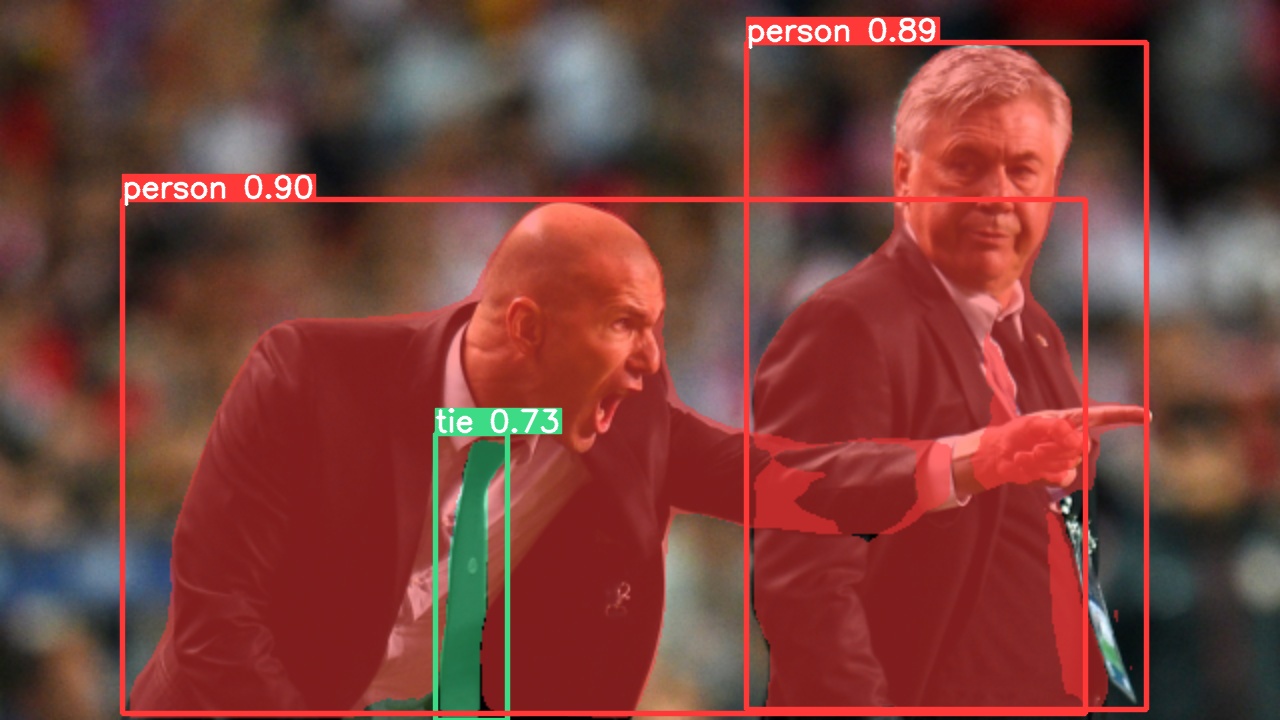
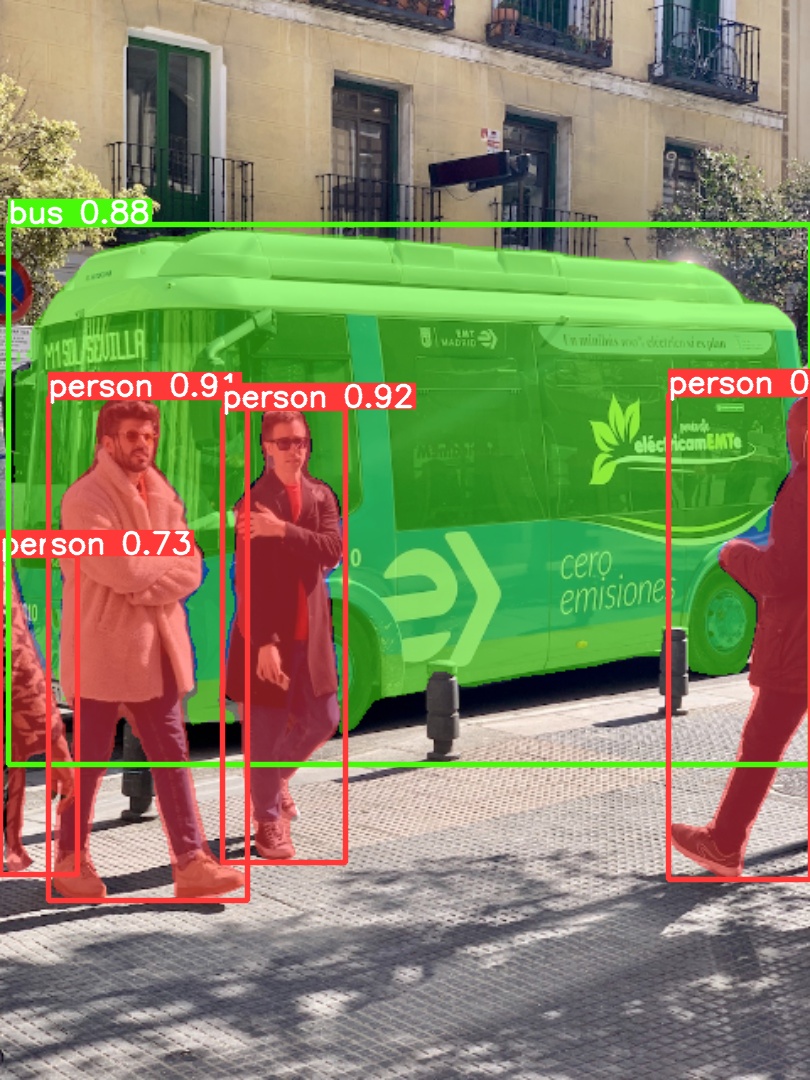
Use the pretrained YOLOv5m-seg.pt model to perform segmentation on bus.jpg:
# Run prediction
python segment/predict.py --weights yolov5m-seg.pt --source data/images/bus.jpg
# Load model from PyTorch Hub (Note: Inference support might vary)
model = torch.hub.load("ultralytics/yolov5", "custom", "yolov5m-seg.pt")
 |  |
|---|
Export
Export the YOLOv5s-seg model to ONNX and TensorRT formats:
# Export model
python export.py --weights yolov5s-seg.pt --include onnx engine --img 640 --device 0
🏷️ Classification
YOLOv5 release v6.2 introduced support for image classification model training, validation, and deployment. Check the Release Notes for details and the YOLOv5 Classification Colab Notebook for quickstart guides.
<details> <summary>Classification Checkpoints</summary> <br>YOLOv5-cls classification models were trained on ImageNet for 90 epochs using a 4xA100 instance. ResNet and EfficientNet models were trained alongside under identical settings for comparison. Models were exported to ONNX FP32 (CPU speed tests) and TensorRT FP16 (GPU speed tests). All speed tests were run on Google Colab Pro for reproducibility.
| Model | Size<br><sup>(pixels) | Acc<br><sup>top1 | Acc<br><sup>top5 | Training<br><sup>90 epochs<br>4xA100 (hours) | Speed<br><sup>ONNX CPU<br>(ms) | Speed<br><sup>TensorRT V100<br>(ms) | Params<br><sup>(M) | FLOPs<br><sup>@224 (B) |
|---|---|---|---|---|---|---|---|---|
| YOLOv5n-cls | 224 | 64.6 | 85.4 | 7:59 | 3.3 | 0.5 | 2.5 | 0.5 |
| YOLOv5s-cls | 224 | 71.5 | 90.2 | 8:09 | 6.6 | 0.6 | 5.4 | 1.4 |
| YOLOv5m-cls | 224 | 75.9 | 92.9 | 10:06 | 15.5 | 0.9 | 12.9 | 3.9 |
| YOLOv5l-cls | 224 | 78.0 | 94.0 | 11:56 | 26.9 | 1.4 | 26.5 | 8.5 |
| YOLOv5x-cls | 224 | 79.0 | 94.4 | 15:04 | 54.3 | 1.8 | 48.1 | 15.9 |
| ResNet18 | 224 | 70.3 | 89.5 | 6:47 | 11.2 | 0.5 | 11.7 | 3.7 |
| ResNet34 | 224 | 73.9 | 91.8 | 8:33 | 20.6 | 0.9 | 21.8 | 7.4 |
| ResNet50 | 224 | 76.8 | 93.4 | 11:10 | 23.4 | 1.0 | 25.6 | 8.5 |
| ResNet101 | 224 | 78.5 | 94.3 | 17:10 | 42.1 | 1.9 | 44.5 | 15.9 |
| EfficientNet_b0 | 224 | 75.1 | 92.4 | 13:03 | 12.5 | 1.3 | 5.3 | 1.0 |
| EfficientNet_b1 | 224 | 76.4 | 93.2 | 17:04 | 14.9 | 1.6 | 7.8 | 1.5 |
| EfficientNet_b2 | 224 | 76.6 | 93.4 | 17:10 | 15.9 | 1.6 | 9.1 | 1.7 |
| EfficientNet_b3 | 224 | 77.7 | 94.0 | 19:19 | 18.9 | 1.9 | 12.2 | 2.4 |
- All checkpoints were trained for 90 epochs using the SGD optimizer with
lr0=0.001andweight_decay=5e-5at an image size of 224 pixels, using default settings.<br>Training runs are logged at https://wandb.ai/glenn-jocher/YOLOv5-Classifier-v6-2. - Accuracy values (top-1 and top-5) represent single-model, single-scale performance on the ImageNet-1k dataset.<br>Reproduce using:
python classify/val.py --data ../datasets/imagenet --img 224 - Speed metrics are averaged over 100 inference images using a Google Colab Pro V100 High-RAM instance.<br>Reproduce using:
python classify/val.py --data ../datasets/imagenet --img 224 --batch 1 - Export to ONNX (FP32) and TensorRT (FP16) was performed using
export.py.<br>Reproduce using:python export.py --weights yolov5s-cls.pt --include engine onnx --imgsz 224
Train
YOLOv5 classification training supports automatic download for datasets like MNIST, Fashion-MNIST, CIFAR10, CIFAR100, Imagenette, Imagewoof, and ImageNet using the --data argument. For example, start training on MNIST with --data mnist.
# Train on a single GPU using CIFAR-100 dataset
python classify/train.py --model yolov5s-cls.pt --data cifar100 --epochs 5 --img 224 --batch 128

# Train using Multi-GPU DDP on ImageNet dataset
python -m torch.distributed.run --nproc_per_node 4 --master_port 1 classify/train.py --model yolov5s-cls.pt --data imagenet --epochs 5 --img 224 --device 0,1,2,3
Val
Validate the accuracy of the YOLOv5m-cls model on the ImageNet-1k validation dataset:
# Download ImageNet validation split (6.3GB, 50,000 images)
bash data/scripts/get_imagenet.sh --val

# Validate the model
python classify/val.py --weights yolov5m-cls.pt --data ../datasets/imagenet --img 224
Predict
Use the pretrained YOLOv5s-cls.pt model to classify the image bus.jpg:
# Run prediction
python classify/predict.py --weights yolov5s-cls.pt --source data/images/bus.jpg
# Load model from PyTorch Hub
model = torch.hub.load("ultralytics/yolov5", "custom", "yolov5s-cls.pt")
Export
Export trained YOLOv5s-cls, ResNet50, and EfficientNet_b0 models to ONNX and TensorRT formats:
# Export models
python export.py --weights yolov5s-cls.pt resnet50.pt efficientnet_b0.pt --include onnx engine --img 224
☁️ Environments
Get started quickly with our pre-configured environments. Click the icons below for setup details.
<div align="center"> <a href="https://bit.ly/yolov5-paperspace-notebook" title="Run on Paperspace Gradient"> <img src="https://github.com/ultralytics/assets/releases/download/v0.0.0/logo-gradient.png" width="10%" /></a> <img src="https://github.com/ultralytics/assets/raw/main/social/logo-transparent.png" width="5%" alt="" /> <a href="https://colab.research.google.com/github/ultralytics/yolov5/blob/master/tutorial.ipynb" title="Open in Google Colab"> <img src="https://github.com/ultralytics/assets/releases/download/v0.0.0/logo-colab-small.png" width="10%" /></a> <img src="https://github.com/ultralytics/assets/raw/main/social/logo-transparent.png" width="5%" alt="" /> <a href="https://www.kaggle.com/models/ultralytics/yolov5" title="Open in Kaggle"> <img src="https://github.com/ultralytics/assets/releases/download/v0.0.0/logo-kaggle-small.png" width="10%" /></a> <img src="https://github.com/ultralytics/assets/raw/main/social/logo-transparent.png" width="5%" alt="" /> <a href="https://hub.docker.com/r/ultralytics/yolov5" title="Pull Docker Image"> <img src="https://github.com/ultralytics/assets/releases/download/v0.0.0/logo-docker-small.png" width="10%" /></a> <img src="https://github.com/ultralytics/assets/raw/main/social/logo-transparent.png" width="5%" alt="" /> <a href="https://docs.ultralytics.com/yolov5/environments/aws_quickstart_tutorial/" title="AWS Quickstart Guide"> <img src="https://github.com/ultralytics/assets/releases/download/v0.0.0/logo-aws-small.png" width="10%" /></a> <img src="https://github.com/ultralytics/assets/raw/main/social/logo-transparent.png" width="5%" alt="" /> <a href="https://docs.ultralytics.com/yolov5/environments/google_cloud_quickstart_tutorial/" title="GCP Quickstart Guide"> <img src="https://github.com/ultralytics/assets/releases/download/v0.0.0/logo-gcp-small.png" width="10%" /></a> </div>🤝 Contribute
We welcome your contributions! Making YOLOv5 accessible and effective is a community effort. Please see our Contributing Guide to get started. Share your feedback through the YOLOv5 Survey. Thank you to all our contributors for making YOLOv5 better!
📜 License
Ultralytics provides two licensing options to meet different needs:
- AGPL-3.0 License: An OSI-approved open-source license ideal for academic research, personal projects, and testing. It promotes open collaboration and knowledge sharing. See the LICENSE file for details.
- Enterprise License: Tailored for commercial applications, this license allows seamless integration of Ultralytics software and AI models into commercial products and services, bypassing the open-source requirements of AGPL-3.0. For commercial use cases, please contact us via Ultralytics Licensing.
📧 Contact
For bug reports and feature requests related to YOLOv5, please visit GitHub Issues. For general questions, discussions, and community support, join our Discord server!
<br> <div align="center"> <a href="https://github.com/ultralytics"><img src="https://github.com/ultralytics/assets/raw/main/social/logo-social-github.png" width="3%" alt="Ultralytics GitHub"></a> <img src="https://github.com/ultralytics/assets/raw/main/social/logo-transparent.png" width="3%" alt="space"> <a href="https://www.linkedin.com/company/ultralytics/"><img src="https://github.com/ultralytics/assets/raw/main/social/logo-social-linkedin.png" width="3%" alt="Ultralytics LinkedIn"></a> <img src="https://github.com/ultralytics/assets/raw/main/social/logo-transparent.png" width="3%" alt="space"> <a href="https://twitter.com/ultralytics"><img src="https://github.com/ultralytics/assets/raw/main/social/logo-social-twitter.png" width="3%" alt="Ultralytics Twitter"></a> <img src="https://github.com/ultralytics/assets/raw/main/social/logo-transparent.png" width="3%" alt="space"> <a href="https://youtube.com/ultralytics?sub_confirmation=1"><img src="https://github.com/ultralytics/assets/raw/main/social/logo-social-youtube.png" width="3%" alt="Ultralytics YouTube"></a> <img src="https://github.com/ultralytics/assets/raw/main/social/logo-transparent.png" width="3%" alt="space"> <a href="https://www.tiktok.com/@ultralytics"><img src="https://github.com/ultralytics/assets/raw/main/social/logo-social-tiktok.png" width="3%" alt="Ultralytics TikTok"></a> <img src="https://github.com/ultralytics/assets/raw/main/social/logo-transparent.png" width="3%" alt="space"> <a href="https://ultralytics.com/bilibili"><img src="https://github.com/ultralytics/assets/raw/main/social/logo-social-bilibili.png" width="3%" alt="Ultralytics BiliBili"></a> <img src="https://github.com/ultralytics/assets/raw/main/social/logo-transparent.png" width="3%" alt="space"> <a href="https://discord.com/invite/ultralytics"><img src="https://github.com/ultralytics/assets/raw/main/social/logo-social-discord.png" width="3%" alt="Ultralytics Discord"></a> </div>