xykt / IPQuality
IP质量检测脚本 - IP Quality Check Script
AI Architecture Analysis
This repository is indexed by RepoMind. By analyzing xykt/IPQuality in our AI interface, you can instantly generate complete architecture diagrams, visualize control flows, and perform automated security audits across the entire codebase.
Our Agentic Context Augmented Generation (Agentic CAG) engine loads full source files into context, avoiding the fragmentation of traditional RAG systems. Ask questions about the architecture, dependencies, or specific features to see it in action.
Embed this Badge
Showcase RepoMind's analysis directly in your repository's README.

Repository Summary (README)
PreviewIP质量体检脚本 - IP Quality Check Script (EN)
支持OS/Platform:Ubuntu | Debian | Linux Mint | Fedora | Red Hat Enterprise Linux (RHEL) | CentOS | Arch Linux | Manjaro | Alpine Linux | AlmaLinux | Rocky Linux | macOS | Anolis OS | Alibaba Cloud Linux | SUSE Linux | openSUSE | Void Linux | Windows (via Docker)
- 中英文双语言支持
- 支持IPv4/IPv6双栈查询
- 精美排版,直观显示,多终端单屏优化展示,便于截图分享
- 基础信息、IP类型、风险评分、风险因子、流媒体解锁、邮局检测六大模块
- 基础数据源自Maxmind数据库
- 风险信息 IPinfo / ipregistry / ipapi / AbuseIPDB / IP2Location / IPQS / DB-IP / Scamalytics / IPWHOIS 多数据库整合
- 流媒体及AI多个服务商 TikTok / Disney+ / Netflix / Youtube / AmazonPrimeVideo / Reddit / ChatGPT 解锁及解锁类型检测
- 多邮局服务商 Gmail / Outlook / Yahoo / Apple / QQ / Mail.ru / AOL / GMX / Mail.com / 163 / Sohu / Sina 连通性检测
- IP地址黑名单400+数据库检测
屏幕截图
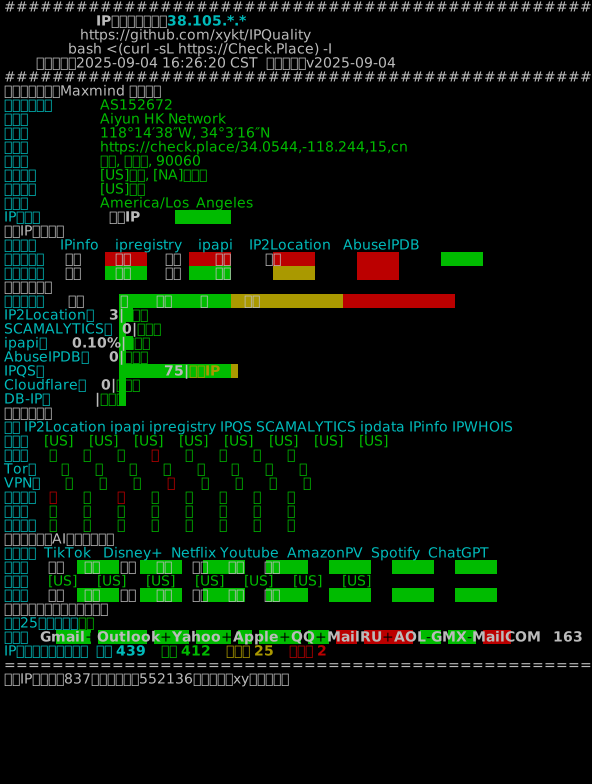
使用方法
便捷模式:交互界面

Bash:
bash <(curl -Ls https://Check.Place) -I
Docker:
- Linux
docker run --rm --net=host -it xykt/check -I && docker rmi xykt/check > /dev/null 2>&1
- Windows (CMD)
docker run --rm --net=host -it xykt/check -I & docker rmi xykt/check > NUL 2>&1
高级模式:参数运行

默认双栈检测:
bash <(curl -Ls https://IP.Check.Place)
只检测IPv4结果:
bash <(curl -Ls https://IP.Check.Place) -4
只检测IPv6结果:
bash <(curl -Ls https://IP.Check.Place) -6
指定检测网卡:
bash <(curl -Ls https://IP.Check.Place) -i eth0
指定代理服务器:
bash <(curl -Ls https://IP.Check.Place) -x http://username:password@proxyserver:port
bash <(curl -Ls https://IP.Check.Place) -x https://username:password@proxyserver:port
bash <(curl -Ls https://IP.Check.Place) -x socks5://username:password@socksproxy:port
选择脚本语言为英文(任选其一):
bash <(curl -Ls https://IP.Check.Place) -E
bash <(curl -Ls https://IP.Check.Place) -l en
跳过检测系统及安装依赖:
bash <(curl -Ls https://IP.Check.Place) -n
自动安装依赖:
bash <(curl -Ls https://IP.Check.Place) -y
报告展示完整IP地址:
bash <(curl -Ls https://IP.Check.Place) -f
输出JSON结果(输出示例):
bash <(curl -Ls https://IP.Check.Place) -j
输出报告ANSI/JSON/纯文本至文件:
bash <(curl -Ls https://IP.Check.Place) -o /path/to/file.ansi
bash <(curl -Ls https://IP.Check.Place) -o /path/to/file.json
bash <(curl -Ls https://IP.Check.Place) -o /path/to/file.txtoranyother
基础信息多语言支持:
bash <(curl -Ls https://IP.Check.Place) -l jp|es|de|fr|ru|pt
隐私模式——禁用在线报告生成功能:
bash <(curl -Ls https://IP.Check.Place) -p
Docker(支持运行参数,须在&前插入):
- Linux
docker run --rm --net=host -it xykt/ipquality && docker rmi xykt/ipquality > /dev/null 2>&1
- Windows (CMD)
docker run --rm --net=host -it xykt/ipquality & docker rmi xykt/ipquality > NUL 2>&1
脚本更新
2026/01/24 12:40 将Spotify检测替换为Reddit检测
2026/01/15 17:23 修正不规范的JSON
2025/08/03 00:00 增加Docker运行方式
2025/08/01 16:15 增加-p隐私模式,禁用在线报告生成功能
2025/07/30 16:30 将所有HTTP请求替换为HTTPS以提升脚本安全性
2025/06/02 21:25 修复25端口检测的错误逻辑,规范化邮件服务商连通性检测方法
2025/04/23 18:00 增加-o输出报告ANSI/JSON/纯文本至文件
2025/04/19 21:00 增加-j的JSON输出模式
2025/03/13 23:15 增加-y自动安装依赖,-n跳过操作系统及依赖检查
2024/11/09 00:30 增加Cloudflare风险评分,修复IP2Location偶发IP类型判断BUG
2024/10/06 01:15 修复极个别运行脚本报错问题
2024/07/23 23:50 增加运行参数-f使报告显示完整IP地址
2024/07/22 01:50 安装依赖包前增加询问,修复Disney+解锁类型错误
2024/06/27 01:00 增加Anolis OS | Alibaba Cloud Linux | SUSE Linux | openSUSE系统支持
2024/05/30 01:15 增加macOS系统支持
2024/05/28 18:00 修复了指定网卡/代理服务器仍然检测默认IP的bug
2024/05/17 00:45 增加报告svg图片分享链接,修复一些排版问题
2024/05/11 23:20 修复因网关阻断25端口导致的邮件检测时间过长的问题,修复Tiktok IPv6结果不准确的bug
2024/05/10 17:50 修复未安装sudo系统无法正常安装依赖的bug
2024/05/10 11:00 增加指定网卡及代理服务器检测支持
2024/05/09 15:00 修正不规范内网IP导致的错误,修正其他若干bug
2024/05/08 23:00 修正Netflix澳洲检测结果不正确的bug
2024/05/08 18:10 更新依赖程序dig检测及安装
2024/05/08 00:00 脚本发布
脚本贡献
Acknowledgments:
| 赞助商 | 商标 | 网址 |
|---|---|---|
| IP2Location |  | https://ip2location.io</br>https://ip2location.com |
| Scamalytics |  | https://scamalytics.com |
-
衷心感谢主流IP风险数据库AbuseIPDB/Cloudflare/DB-IP/IP2Location/ipapi/IPinfo/IPQS/ipregistry/IPWHOIS/Scamalytics提供的风险数据(排名不分先后)
-
感谢lmc999,本脚本局部代码参考原版流媒体解锁检测脚本
-
感谢spiritLHLS,本脚本局部代码参考融合怪测评脚本
服务器赞助商(排名不分先后)
| 赞助商 | 商标 | 网址 |
|---|---|---|
| V.PS |  | https://v.ps |
| BAGE |  | https://bagevm.com |
| LisaHost</br>丽萨主机 |  | https://lisahost.com |
| DreamCloud |  | https://as211392.com |
| VIRCS</br>威尔克斯 |  | https://vircs.com |
RapidProxy</br>原生IP |  | https://rapidproxy.io |
IPOasis</br>原生IP |  | https://ipoasis.com |
E-Mail: sponsor@check.place Telegram Bot: https://t.me/xythebot
*仅接受长期稳定运营,信誉良好的商家
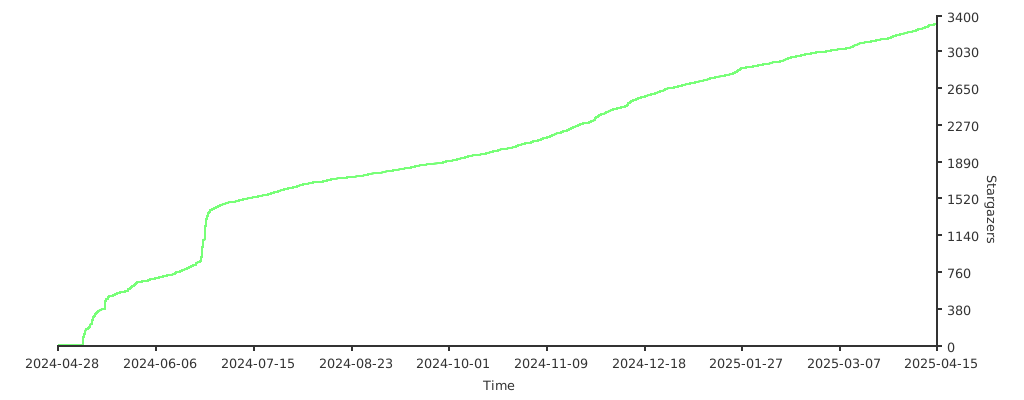
Stars History:
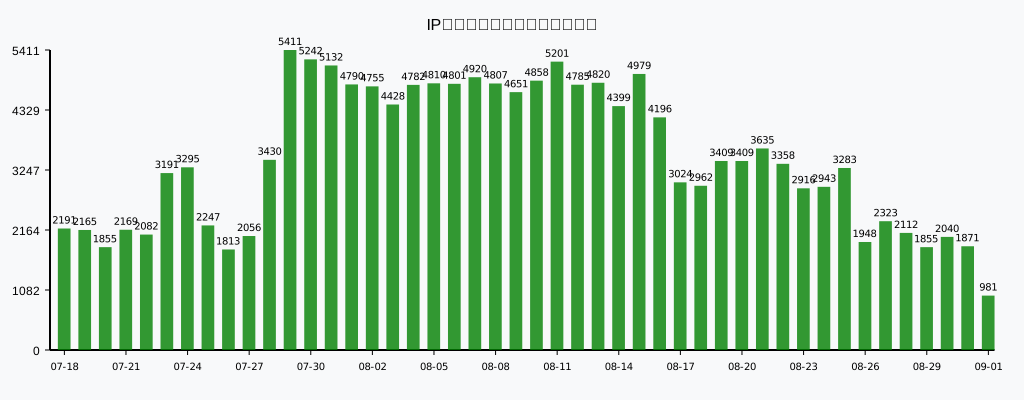
Daily Runs History: